coredns ndots
Overview
Reduce unnecessary CoreDNS requests from application pods by adding ndots configuration to Deployments or Pods.
If using ArgoCD, the same CoreDNS ndots setting can be applied to Rollout custom resources.
Background
CoreDNS
CoreDNS resolves DNS names within a Kubernetes cluster. It provides DNS services for all Kubernetes resources including Services and Pods. CoreDNS is managed by the CNCF (Cloud Native Computing Foundation).
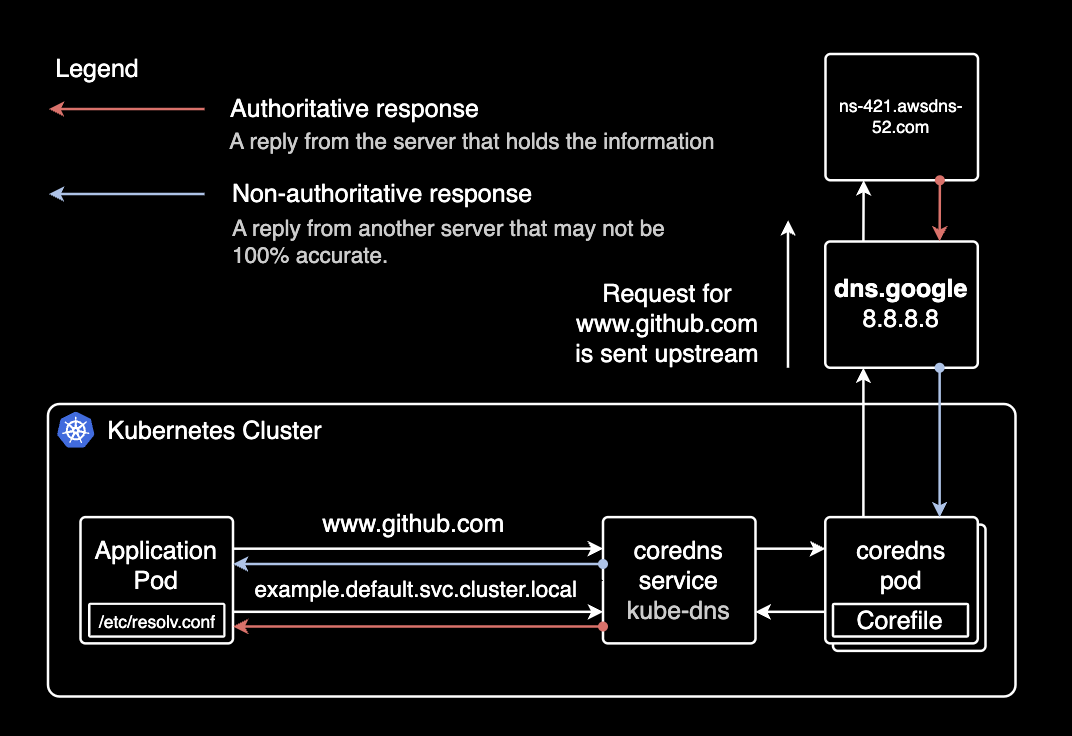
Pods in the cluster query CoreDNS to discover other Services and Pods.
kube-dns vs CoreDNS
kube-dns was the DNS addon before CoreDNS. CoreDNS offers better flexibility, extensibility, and supports various backend data sources and plugins.
Kubernetes officially recommends CoreDNS over kube-dns. CoreDNS has been the default DNS addon since Kubernetes 1.13.
CoreDNS Address Format
When using CoreDNS, Services and Pods are automatically assigned DNS A records.
Service A Record
SERVICE-NAME.NAMESPACE.svc.cluster.localserver-mysql.mysql.svc.cluster.local
------------ -----
| |
| +---> Namespace
+--------------> Service Nameserver-redis.redis.svc.cluster.local
------------ -----
| |
| +---> Namespace
+--------------> Service NamePod A Record
POD-IP-ADDRESS.NAMESPACE.pod.cluster.localExample: A Pod with IP 172.12.3.4 in the default namespace:
172-12-3-4.default.pod.cluster.local
---------- -------
    |         |
    |         +---> Namespace
    +-------------> Pod IP address
Environment
EKS Cluster
EKS v1.21 with EC2 Managed Nodes.
$ kubectl get node | awk '{print $5}'
VERSION
v1.21.5-eks-9017834
v1.21.5-eks-9017834
...
CoreDNS
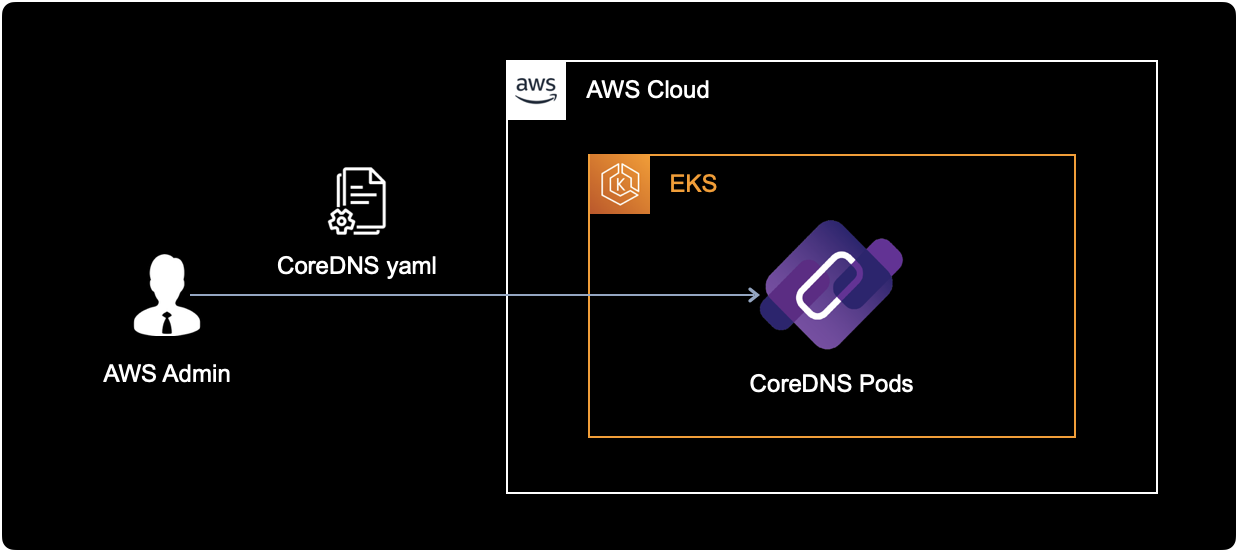
CoreDNS deployed as a Deployment manifest on the EKS cluster.
All CoreDNS resources are in the kube-system namespace. Pods in other namespaces access CoreDNS through its ClusterIP Service.
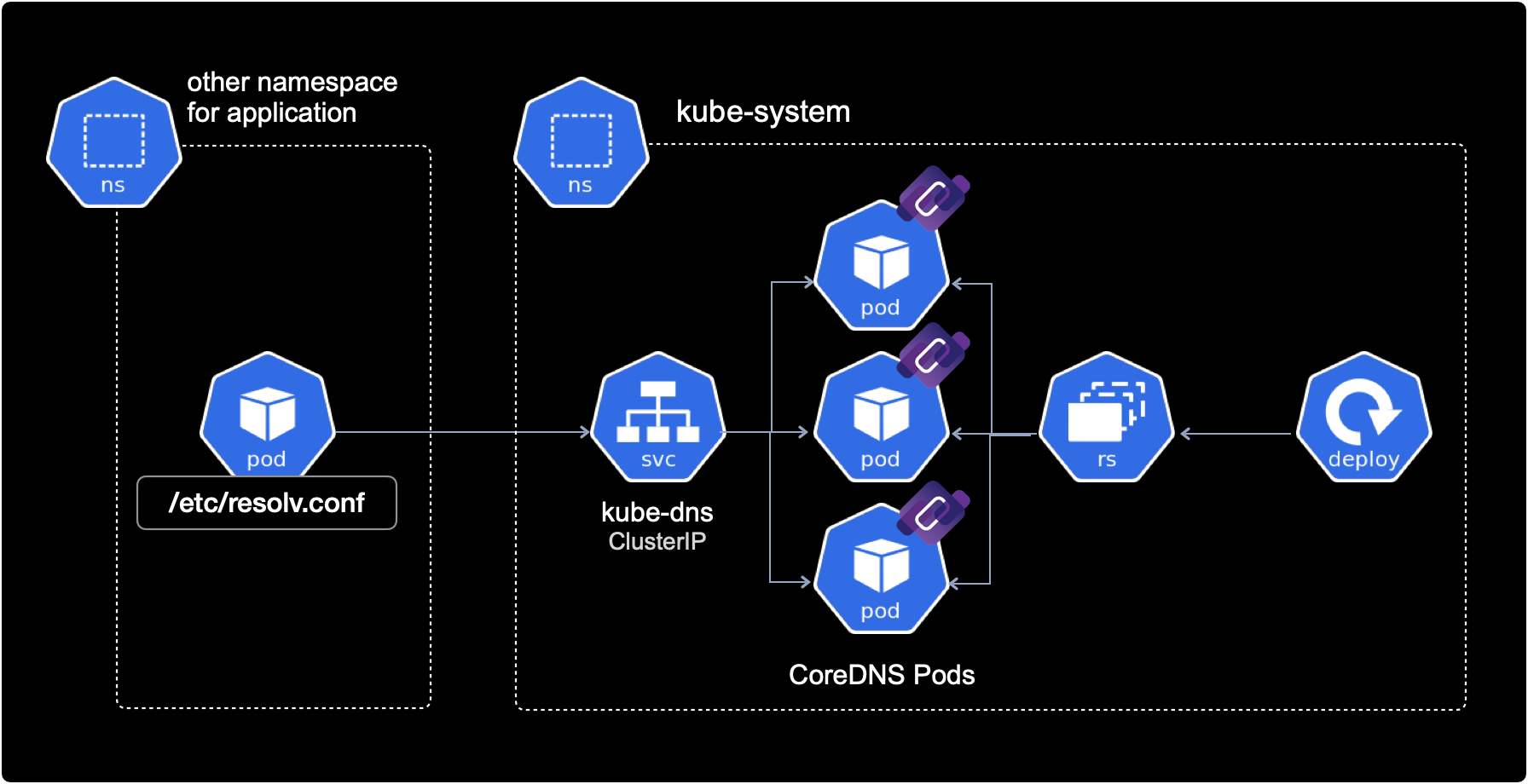
CoreDNS communicates with other pods via cluster-internal networking, hence the ClusterIP Service type.
CoreDNS provides DNS services through its pods:
$ kubectl get deploy,pod \
    -n kube-system \
    -l k8s-app=kube-dns
NAME READY UP-TO-DATE AVAILABLE AGE
deployment.apps/coredns 18/18 18 18 15d
NAME READY STATUS RESTARTS AGE
pod/coredns-86dfdb55fc-687dx 1/1 Running 0 15d
pod/coredns-86dfdb55fc-695t7 1/1 Running 0 15d
pod/coredns-86dfdb55fc-7x9mn 1/1 Running 0 15d
pod/coredns-86dfdb55fc-bqxw8 1/1 Running 0 15d
pod/coredns-86dfdb55fc-cq5rd 1/1 Running 0 15d
pod/coredns-86dfdb55fc-dhfch 1/1 Running 0 15d
pod/coredns-86dfdb55fc-f2v8z 1/1 Running 0 15d
pod/coredns-86dfdb55fc-gr46t 1/1 Running 0 15d
pod/coredns-86dfdb55fc-l562c 1/1 Running 0 15d
pod/coredns-86dfdb55fc-m6qm4 1/1 Running 0 15d
pod/coredns-86dfdb55fc-rscmz 1/1 Running 0 15d
pod/coredns-86dfdb55fc-t2tt5 1/1 Running 0 15d
pod/coredns-86dfdb55fc-td8pw 1/1 Running 0 15d
pod/coredns-86dfdb55fc-tn5gv 1/1 Running 0 15d
pod/coredns-86dfdb55fc-w7n86 1/1 Running 0 15d
pod/coredns-86dfdb55fc-zjqpv 1/1 Running 0 15d
pod/coredns-86dfdb55fc-zk68t 1/1 Running 0 15d
pod/coredns-86dfdb55fc-zmjmb 1/1 Running 0 15d18 CoreDNS pods distributed across multiple worker nodes for high availability (HA).
CoreDNS has a ClusterIP Service to receive requests from other namespaces:
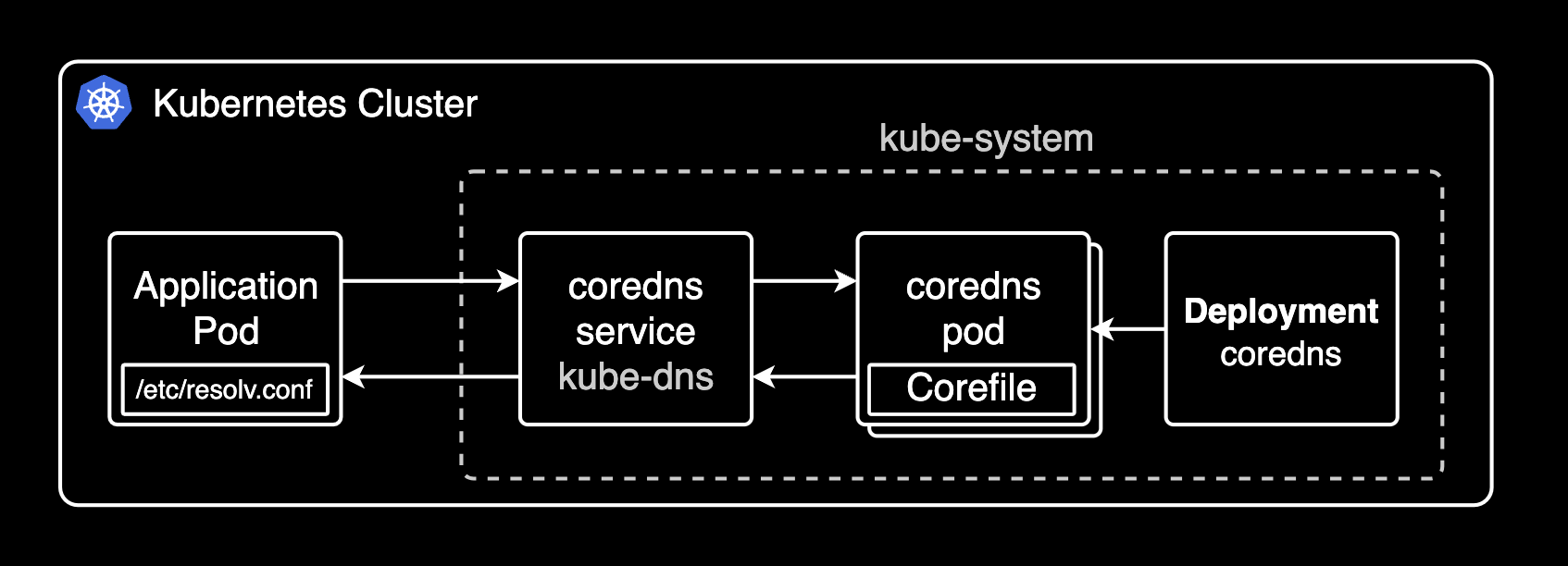
kubectl get service -n kube-system kube-dns -o wideNAME TYPE CLUSTER-IP EXTERNAL-IP PORT(S) AGE SELECTOR
kube-dns ClusterIP 172.20.0.10 <none> 53/UDP,53/TCP,9153/TCP 626d k8s-app=kube-dnsCoreDNS receives requests on TCP/UDP port 53. TCP port 9153 is for metrics collection.
ndots Configuration
1. Modify Spec
Adding ndots to an ArgoCD Rollout resource:
kubectl edit rollout -n default hello-greeterapiVersion: argoproj.io/v1alpha1
kind: Rollout
metadata:
...
spec:
template:
spec:
containers:
...
dnsConfig: # ndots configuration
options: # ndots configuration
- name: ndots # ndots configuration
value: "1" # ndots configurationndots defines the minimum number of dots in a domain name before it's treated as an FQDN. Changing from the default 5 to 1 reduces unnecessary DNS queries.
2. Apply Configuration
After adding ndots, apply via kubectl apply or push to the source repo (if using ArgoCD).
Changes made via kubectl edit take effect immediately.
3. Verify ndots
Check spec.template.spec.dnsConfig on the Deployment or Rollout:
kubectl get deploy -n default hello-greeterspec:
template:
spec:
containers:
# ...
dnsConfig:
options:
- name: ndots
value: "1"Verify inside the pod's /etc/resolv.conf:
kubectl exec -it <POD_NAME> -n default -- cat /etc/resolv.confsearch default.svc.cluster.local svc.cluster.local cluster.local ap-northeast-2.compute.internal
nameserver 172.20.0.10
options ndots:1- nameserver: Points to the CoreDNS Service IP (172.20.0.10). All cluster pods use CoreDNS as their DNS server by default.
- resolv.conf generation: kubelet registers the CoreDNS
ClusterIPasnameserverin/etc/resolv.confwhen starting pods. - options: Confirms
ndots:1(default is 5).
Results
For most workloads, setting ndots to 2 instead of the default 5 is sufficient. This is also recommended in the Amazon EKS Best Practices.
On a cluster with 7 nodes and ~130 pods, changing ArgoCD's ndots from 5 to 2 reduced total DNS query volume by 56%.
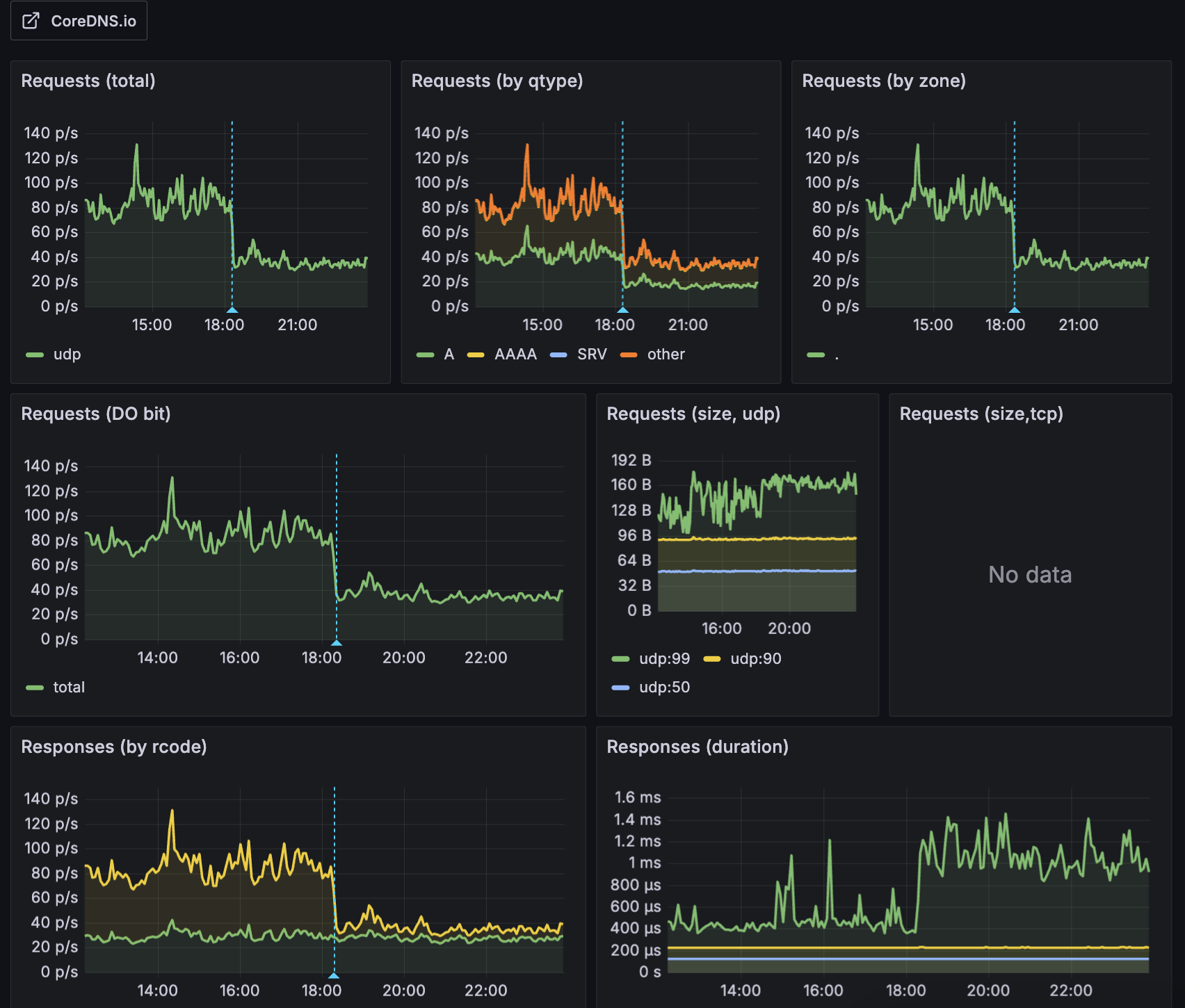
Most external domains (e.g., api.google.com, collector.newrelic.com) contain 2+ dots and are treated as FQDNs with ndots=2, skipping unnecessary internal search domain queries. This improves external DNS request performance and reduces CoreDNS CPU load and I/O timeout issues caused by unnecessary DNS failures.
The following diagram shows how CoreDNS routes queries internally or externally depending on the domain:
References
AWS:
- Amazon EKS Best Practices Guide: CoreDNS configuration best practices
Articles:
- How to change ndots option default value of dns in Kubernetes
- Pod's DNS Config: Kubernetes official docs
- Kubernetes pods /etc/resolv.conf ndots:5 option and why it may negatively affect your application performances
Datadog: