grafana image renderer
Overview
Grafana Image Renderer is a separate service that renders dashboard panels as PNG images using a headless Chromium browser. It powers features like PDF exports, shared panel snapshots, and — most importantly — image attachments on alert notifications.
This post covers enabling the renderer via the Grafana subchart inside kube-prometheus-stack, wiring it into Grafana Unified Alerting, and shipping Slack alerts with inline dashboard screenshots — all within an air-gapped cluster.
Why Image Renderer
Text-only alerts tell you what broke; an attached dashboard image tells you what it looks like right now. The difference matters when:
- On-call is triaging on mobile and can't pull up Grafana immediately
- Alert conditions need a visual context (spike shape, duration, neighboring series)
- Post-incident review wants a snapshot from the moment of firing
Grafana has no built-in rendering; it delegates to a separate grafana-image-renderer service.
Architecture
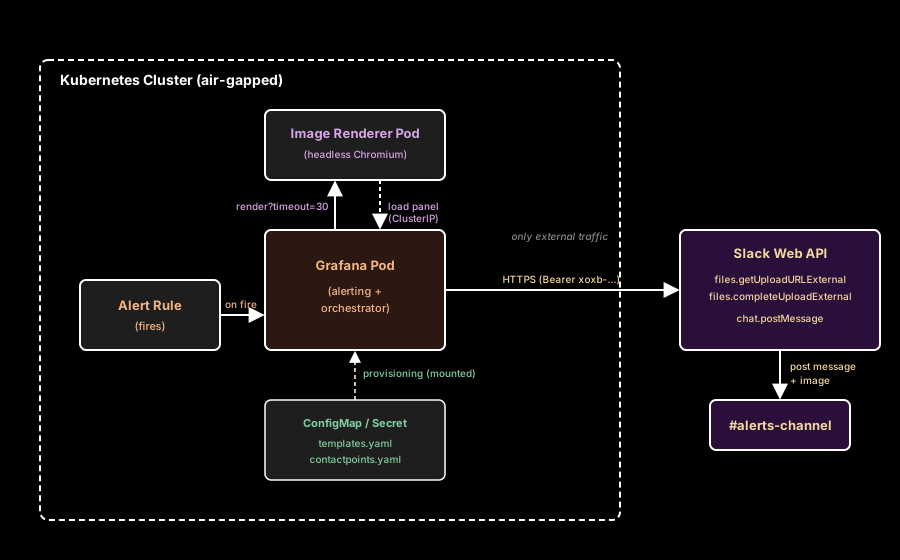
| Step | Detail |
|---|---|
| Grafana evaluates alert rule | On fire, takes screenshot of attached dashboardUid + panelId |
| Renderer receives HTTP request | URL contains target dashboard URL, timeout, dimensions |
| Chromium loads Grafana page | Uses internal Service DNS (grafana.monitoring:80) |
| Renderer returns PNG bytes | Grafana attaches to notification payload |
| Grafana calls Slack Web API | Bot token uploads file via 2-step upload API |
Key insight: the renderer never talks to the outside world. It calls Grafana via ClusterIP, which means it works fine in air-gapped clusters. The only external traffic is the final Slack API call — and that's from Grafana Pod, not the renderer.
Why a Bot Token (not Incoming Webhook)
Slack exposes two alerting paths, and only one supports file uploads:
| Method | Auth | Text message | Image file upload |
|---|---|---|---|
| Incoming Webhook | URL itself (hooks.slack.com/...) | OK | Not supported |
| Bot Token | Authorization: Bearer xoxb-... | OK (chat.postMessage) | OK (files.getUploadURLExternal + files.completeUploadExternal) |
In an air-gapped environment you cannot serve a public image URL for webhooks to reference, so the bot token path is the only option that actually delivers images. Required Slack Bot Token Scopes:
chat:write— post messagesfiles:write— upload image files
The bot must also be invited to the target channel (/invite @<bot-name>). File upload API rejects with not_in_channel otherwise, even if chat:write.public is granted.
Enabling Image Renderer
All config lives under the Grafana subchart in kube-prometheus-stack values.yaml.
kube-prometheus-stack:
  grafana:
    # existing grafana config above ...

    imageRenderer:
      enabled: true
      replicas: 1

      image:
        repository: grafana/grafana-image-renderer
        tag: v5.8.2
        pullPolicy: IfNotPresent

      resources:
        requests:
          cpu: 100m
          memory: 512Mi
        limits:
          memory: 1Gi

      serviceMonitor:
        enabled: true
Setting imageRenderer.enabled: true alone is sufficient — the Grafana chart auto-wires the renderer URL into Grafana Pod env:
GF_RENDERING_SERVER_URL=http://<release>-grafana-image-renderer.<ns>:8081/render
GF_RENDERING_CALLBACK_URL=http://<release>-grafana.<ns>:80/
No manual URL plumbing needed.
Tag naming convention
Image Renderer v5+ tags are prefixed with v: v5.8.2, not 5.8.2. This differs from the Grafana server image itself (grafana/grafana:11.4.0 has no v). Pulling 5.8.2 will fail.
Healthcheck path
v5+ serves /healthz; older versions serve /. The Grafana chart defaults to /healthz, which aligns with v5+ naturally. No override needed when you pin a v5+ tag.
Enabling Screenshot Capture
Grafana doesn't call the renderer on fire by default. Two grafana.ini keys enable it:
grafana:
  grafana.ini:
    unified_alerting.screenshots:
      capture: true
      capture_timeout: 30s
upload_external_image_storage: false| Key | Role |
|---|---|
capture: true | Request a PNG on every transition to alerting |
capture_timeout: 30s | Max time allowed for renderer to return (default 10s is too short for heavy dashboards) |
upload_external_image_storage: false | Skip S3/GCS upload; keep images internal for Slack API delivery |
Why 30s
Default 10s fails on complex dashboards (many panels, long-range Mimir queries, slow data source). Symptom in Grafana logs:
level=error msg="Failed to send request to remote rendering service"
error="...: context deadline exceeded"
level=warn msg="Failed to take an image"
reason="transition to alerting"
error="failed to take screenshot: [rendering.serverTimeout] "
And matching renderer-side:
status=408 status_text="Request Timeout" duration=10.033sThe fix is purely a Grafana config — the timeout URL parameter sent to the renderer is controlled by capture_timeout. The renderer itself has no default cap.
For dashboards that still time out at 30s, the real fix is query optimization or pointing the alert at a lighter, purpose-built panel instead of a complex overview.
Slack Contact Point Provisioning
What is a Contact Point
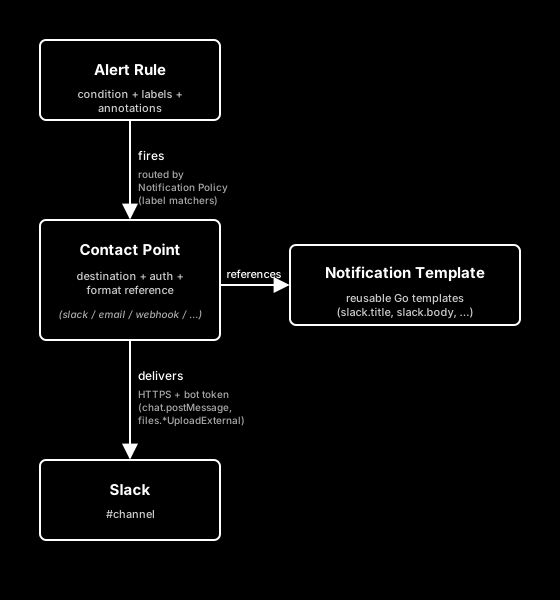
In Grafana Unified Alerting, a Contact Point is the destination an alert gets delivered to. It's the object that holds "how do I reach this channel": receiver type (slack, email, pagerduty, webhook, teams, ...), authentication (token, URL, integration key), and optional message formatting overrides (title, text).
A Contact Point does not decide which alerts are sent to it — that's the job of the Notification Policy, which matches alert labels and routes them to a contact point by name. Keeping the two concerns separate means a single contact point definition (e.g. slack-aws-major-alarm) can be reused by any number of alert rules simply by labeling them appropriately.
| Concept | Role | Analogy |
|---|---|---|
| Alert Rule | "When to fire" — condition + labels + annotations | Event source |
| Notification Policy | "Where to send" — label matchers → contact point by name | Router |
| Contact Point | "How to deliver" — destination + auth + format | Destination + delivery config |
| Notification Template | "What the message looks like" — reusable Go templates | Message formatter |
One contact point = one delivery pipeline. Each receiver inside a contact point is a physical send target; most contact points have a single receiver, but a contact point can fan out to multiple receivers (e.g. Slack and PagerDuty together) when you always want dual delivery for a class of alerts.
Provisioning as code
Define contact points as file-based provisioning so they live in git. The chart mounts contactpoints.yaml as a Secret (not a ConfigMap) when declared under alerting.contactpoints.yaml.secret:, keeping the bot token out of ConfigMap plaintext.
grafana:
  alerting:
    contactpoints.yaml:
      secret:
        apiVersion: 1
        contactPoints:
          - orgId: 1
            name: slack-hook-test
            receivers:
              - uid: slack-hook-test
                type: slack
                settings:
                  token: xoxb-...
                  recipient: "#hook-test"
                  title: '{{ `{{ template "slack.title" . }}` }}'
                  text: '{{ `{{ template "slack.body" . }}` }}'
          - orgId: 1
            name: slack-aws-major-alarm
            receivers:
              - uid: slack-aws-major-alarm
                type: slack
                settings:
                  token: xoxb-...
                  recipient: "#aws-major-alarm"
                  title: '{{ `{{ template "slack.title" . }}` }}'
                  text: '{{ `{{ template "slack.body" . }}` }}'
Long term, the token should move to an external secret (ESO / Vault). Hardcoded tokens in values.yaml are a stopgap.
One bot, many channels
A single bot token can drive any number of contact points — recipient scopes each to a channel. Slack bot scopes are workspace-level, so one install covers them all. Just remember to invite the bot into every target channel.
Notification Template
Contact points get message format from notification templates, defined in templates.yaml. Templates are referenced by name, so multiple contact points can share one template for consistent formatting.
grafana:
  alerting:
    templates.yaml:
      apiVersion: 1
      templates:
        - orgId: 1
          name: slack_common
          template: |
            {{ `{{ define "slack.title" -}}
            {{ if eq .Status "firing" }}🚨 [FIRING]{{ else }}✅ [RESOLVED]{{ end }} {{ .CommonLabels.alertname }}
            {{- end }}

            {{ define "slack.body" -}}
            {{ range .Alerts -}}
            *Severity:* {{ if eq .Labels.severity "emergency" }}🚨🚨 emergency{{ else if eq .Labels.severity "critical" }}🔴 critical{{ else if eq .Labels.severity "warning" }}🟡 warning{{ else if eq .Labels.severity "info" }}🔵 info{{ else if .Labels.severity }}⚪ {{ .Labels.severity }}{{ else }}⚪ unknown{{ end }}
            *Summary:* {{ .Annotations.summary }}
            *Description:* {{ .Annotations.description }}
            {{ if .Annotations.usage }}*Value:* {{ .Annotations.usage }}
            {{ end }}{{ if .Labels.destination_service_name }}*Service:* {{ .Labels.destination_service_name }}
            {{ end }}{{ if .Labels.host }}*Host:* {{ .Labels.host }}
            {{ end }}{{ end -}}
            {{- end }}` }}
Escaping Helm tpl
The Grafana subchart runs values through Helm's tpl function, which collides with Grafana's own {{ ... }} template syntax. Wrap the whole block in Helm backtick literals ({{ `...` }}) so the inner {{ }} passes through verbatim to Grafana.
Without the backticks, Helm attempts to evaluate {{ define "slack.title" }} as a Helm function and fails:
error calling tpl: ... template: gotpl: unexpected "\\" in define clauseSeverity-based emoji
Title stays minimal ([FIRING] / [RESOLVED]); severity differentiation moves to the body field so the Slack preview list stays scannable:
| severity | body rendering |
|---|---|
emergency | 🚨🚨 emergency |
critical | 🔴 critical |
warning | 🟡 warning |
info | 🔵 info |
| non-standard value | ⚪ <value> (passthrough) |
| missing / empty | ⚪ unknown (fallback) |
Optional fields with if guards
Fields that only appear on specific alert types (usage annotation, destination_service_name label from Istio metrics, host label from node alerts) are wrapped in {{ if }} guards so they're emitted only when present. Missing fields render as empty without erroring, but an empty *Usage:* line looks sloppy — the guard suppresses the whole line.
{{ if .Annotations.usage }}*Value:* {{ .Annotations.usage }}
{{ end }}
Severity Convention
A consistent severity label set is a prerequisite for clean routing and templating. Four-level model:
| severity | Criteria | Response |
|---|---|---|
emergency | Total outage, direct revenue loss, security incident | Page on-call (PagerDuty) — wake someone up |
critical | Partial outage, some customers affected, SLO burn rate high | Slack critical channel with mention, business-hours immediate |
warning | Trend anomaly, resource pressure, about-to-be-critical | Slack warning channel, investigate during business hours |
info | Informational, auto-recovery, deploy/scale events | Slack info channel or digest |
Judgement question: "Would this wake someone at 3 AM?"
- Yes →
emergency - Maybe, but a few hours can wait →
critical - No, handle during business hours →
warning - No, just for visibility →
info
This maps cleanly to Notification Policy matchers with continue: true for dual routing (e.g., emergency → Slack + PagerDuty).
Verification
After deploy, confirm the wiring in order:
# 1. Renderer Pod healthy
kubectl -n monitoring get pods -l app.kubernetes.io/name=grafana-image-renderer

# 2. Grafana picked up env vars
kubectl -n monitoring logs deployment/kube-prometheus-stack-grafana -c grafana \
  | grep -E "GF_RENDERING_SERVER_URL|Backend rendering"

# 3. Provisioned contact points + templates loaded
kubectl -n monitoring logs deployment/kube-prometheus-stack-grafana -c grafana \
  | grep -E "template definitions loaded|ngalert.notifier"

# 4. Secret contains contactpoints.yaml
kubectl -n monitoring get secret kube-prometheus-stack-grafana-config-secret \
  -o jsonpath='{.data.contactpoints\.yaml}' | base64 -d

# 5. Trigger a real alert (Contact Point "Test" button skips screenshots,
#    synthetic alert has no dashboardUid/panelId attached)
Gotchas
not_in_channel with bot token
body="{\"ok\":false,\"error\":\"not_in_channel\"}"
msg="Failed to upload image" err="failed to finalize upload: ... not_in_channel"
The bot successfully authenticated, but file sharing requires channel membership regardless of scopes. /invite @<bot-name> resolves it. chat:write.public does not — that only permits text messages, not file uploads.
Contact Point Test button has no image
Grafana's Test button creates a synthetic alert with no dashboardUid/panelId bound. The renderer is never invoked. To verify image attachment, force a real alert rule to fire (temporarily lower a threshold, or create a dummy 1 > 0 rule pointing at any panel).
Stale Firing after condition clears
Seeing [FIRING] notifications when the query value has dropped below threshold is usually one of:
- Keep firing for setting on the rule keeps state active after condition clears (anti-flap)
- Alert condition uses
Reduce: maxover a range window — the historical peak keeps firing even if the latest value is low - Evaluation interval too long — state won't transition to Resolved until next evaluation
Fix by preferring Reduce: last and a 1-minute evaluation interval for rules where recency matters, and setting Keep firing for: 0s unless flap protection is genuinely needed.
Rendering timeout on heavy dashboards
Symptoms in logs: status=408 Request Timeout, duration=10.033s from the renderer. The fix is capture_timeout: 30s as shown above. If 30s still fails, the dashboard itself is the problem — point the alert at a simpler, dedicated panel instead.
Takeaways
- Air-gapped clusters can deliver image-attached Slack alerts end-to-end. The renderer never reaches out; only Grafana → Slack API is external.
- Bot token is mandatory for image attachment. Webhook URL cannot upload files.
- The Grafana subchart auto-wires renderer URLs when
imageRenderer.enabled: true— no manual env plumbing. - Provisioning contact points + templates as code keeps on-call ergonomics reproducible. Token still deserves ESO; everything else is safe in git.
- Default
capture_timeout: 10sis too aggressive for real dashboards. Bump to 30s and rethink panel complexity if that isn't enough. - Standardize a four-level severity label set before building routing and templates — everything else composes from it.