karpenter spot fallback
Overview
The most effective way to reduce compute costs is proper right-sizing combined with Spot instances.
Karpenter's Fallback feature enables uninterrupted Spot instance usage by automatically falling back to On-Demand when Spot capacity is unavailable.
Environment
- EKS 1.32
- Karpenter 1.8.1 (official helm chart)
- Node Termination Handler 1.25.2 (official helm chart)
- NTH runs in IMDS (Instance Metadata Service) mode, deployed as a DaemonSet
Configuration Guide
Create Spot Service-Linked Role
Spot instances require the AWSServiceRoleForEC2Spot Service-Linked Role in the AWS account. Without it, Karpenter cannot create Spot instances and only provisions On-Demand nodes.
This role handles price monitoring, capacity management, and instance interruption processing for Spot instances.
Without the Service-Linked Role, Karpenter logs show:
{
  "level": "ERROR",
  "message": "failed launching nodeclaim",
  "error": "creating instance, insufficient capacity, with fleet error(s), AuthFailure.ServiceLinkedRoleCreationNotPermitted: The provided credentials do not have permission to create the service-linked role for EC2 Spot Instances."
}
Create the role via AWS CLI (one-time per account):
aws iam create-service-linked-role --aws-service-name spot.amazonaws.comThe AWS Console auto-creates this role on first Spot request, but API-based requests (like Karpenter) require manual creation.
Node Provisioning
Karpenter triggers node provisioning when Pending pods exist:
---
title: Karpenter node provisioning
---
flowchart LR
  p["`Pods
  Pending`"]
  subgraph k8s[Kubernetes Cluster]
    direction LR
    subgraph cp["Control Plane"]
        kas["kube-apiserver"]
    end
    subgraph kube-system
      k["`**Pod**
      karpenter`"]
    end
    k --> np
    k -- Watch --> p
    k e1@--Create nodeclaim--> nodeclaim
    np[nodepool] --> ec2nc[ec2nodeclass]
  end
  subgraph wn["Worker Node (EC2)"]
    kubelet["`**kubelet**
    controlled by systemd`"]
  end
  nodeclaim e2@--Create EC2 via IAM Role--> wn

  kubelet --Join cluster--> kas

  style np fill:darkorange,color:#fff,stroke:#333
  style ec2nc fill:darkorange,color:#fff,stroke:#333

  e1@{ animate: true }
  e2@{ animate: true }

  linkStyle 2 stroke:darkorange,stroke-width:2px
  linkStyle 4 stroke:darkorange,stroke-width:2px
Karpenter Helm Chart Structure
Install Karpenter using the official Helm chart. Since v0.32.0, charts are distributed via OCI registry.
Download the karpenter chart:
# List versions
crane ls public.ecr.aws/karpenter/karpenter

# Pull chart from OCI registry
helm pull oci://public.ecr.aws/karpenter/karpenter --version 1.8.1 --untar
---
title: Karpenter helm chart
---
flowchart LR
admin["Cluster Admin"]
admin --helm install--> Main["`**Chart**
karpenter`"]
admin --helm install--> Sub["`**Sub Chart**
karpenter-nodepool`"]
subgraph k8s[Kubernetes Cluster]
direction LR
subgraph kube-system
Main --> Controller["`**Pod**
karpenter`"]
end
Sub --> NodePool["`CR
nodepool`"]
Sub --> EC2NC["`CR
ec2nodeclass`"]
Controller -.-> NodePool
Controller -.-> EC2NC
end
style Main fill:#6c5ce7,color:#fff,stroke:#333
style Sub fill:#6c5ce7,color:#fff,stroke:#333The karpenter-nodepool chart containing Karpenter custom resources is a custom chart, not officially provided.
Managing Karpenter via Helm charts enables templated Kubernetes resources with environment-specific values (dev/stage/prod), atomic deployments with version-based rollback, and dependency management across NodePool, EC2NodeClass, and RBAC configurations. Combined with GitOps workflows, infrastructure changes become trackable and reviewable as code.
Spot Interruption Handling
Two approaches for Karpenter to safely handle Spot Interruption Notices:
- Karpenter + Node Termination Handler
- EventBridge Rules + SQS + Karpenter
Karpenter's FAQ recommends the SQS approach, but the NTH approach offers better operational simplicity.
Karpenter handles node provisioning while NTH detects Spot interruption signals and manages pod eviction:
flowchart LR
  subgraph k8s[Kubernetes Cluster]
    direction LR
    k["`**Pod**
    karpenter`"]
    note1["Node Termination Handler is running on IMDS mode"]
    note2["`Karpenter official docs recommend not using NTH together [1]`"]
    subgraph node1["Karpenter Node (Spot)"]
      direction LR
      nth1["`**DaemonSet Pod**
      node-termination-handler`"]
      imds1["`**IMDS**
      169.254.169.254`"]
    end
    subgraph node2["Karpenter Node (Spot)"]
      direction LR
      nth2["`**DaemonSet Pod**
      node-termination-handler`"]
      imds2["`**IMDS**
      169.254.169.254`"]
    end
  end
  spotitn["Spot Interruption Notice"]

  k --Node provisioning--> node1
  k --Node provisioning--> node2
  nth1 e1@--Handling Spot ITN--> imds1
  nth2 e2@--Handling Spot ITN--> imds2
  spotitn -.->|Send Spot ITN| imds1
  spotitn -.->|Send Spot ITN| imds2

  note1 ~~~ note2

  style k fill:darkorange,color:#fff,stroke:#333
  style note1 fill:transparent,color:#fff,stroke:#333
  style note2 fill:transparent,color:#fff,stroke:#333
  e1@{ animate: true }
  e2@{ animate: true }
1: https://karpenter.sh/docs/faq/#interruption-handling
Spot Nodepool Fallback
Use Fallback with weight-based NodePool selection for Spot/On-Demand.
NodePool Weight Configuration
Set spec.weight on the NodePool resource:
apiVersion: karpenter.sh/v1
kind: NodePool
metadata:
  name: batch
spec:
  template:
    spec:
      requirements:
      - key: karpenter.sh/capacity-type
        operator: In
        values:
        - spot
  weight: 100 # Set 10 for fallback on-demand nodepool
Karpenter selects the highest-weight NodePool among matching candidates. If allocation fails on the higher-weight NodePool, it falls back to a lower-weight one.
Pods must specify nodeAffinity for both the primary (Spot) and fallback NodePools:
apiVersion: v1
kind: Pod
metadata:
  name: my-pod
  namespace: default
  labels:
    app: my-app
spec:
  affinity:
    nodeAffinity:
      requiredDuringSchedulingIgnoredDuringExecution:
        nodeSelectorTerms:
          - matchExpressions:
            - key: karpenter.sh/nodepool
              operator: In
              values:
              - batch           # Primary (spot) nodepool
              - batch-fallback  # Fallback (on-demand) nodepool
Karpenter nodes are automatically labeled with karpenter.sh/nodepool at creation time. This label enables pod assignment to specific NodePools and their fallbacks.
System architecture:
flowchart LR
  subgraph k8s[Kubernetes Cluster]
    direction LR
    pod["`**Pod**
        (Pending)`"]
    subgraph kube-system
      karpenter["`**Pod**
      karpenter`"]
    end
    np-batch["`**nodepool**
    batch
    Weight: 100`"]
    np-batch-fallback["`**nodepool**
    batch-fallback
    Weight: 10`"]

    nc["nodeclaim"]
  end

  node["`EC2
  Worker Node`"]

  karpenter --Watch--> pod
  karpenter --> np-batch
  np-batch -->|"Insufficient capacity"| np-batch-fallback
  np-batch -->|"Capacity available"| node
  np-batch-fallback --> nc --Create EC2--> node

  style np-batch fill:darkorange,color:#fff,stroke:#333
  style np-batch-fallback fill:darkorange,color:#fff,stroke:#333
When node provisioning starts, Karpenter selects the highest-weight Spot NodePool first. If Spot capacity is insufficient, the fallback NodePool is selected.
Architecture inspired by Sendbird's session 'Amazon EKS Cloud Optimization and Generative AI Strategy' at AWS Summit Seoul 2025.
Metrics Collection
Karpenter provides NodePool and cluster-level metrics.
When using prometheus-operator, create a ServiceMonitor to collect NodePool-level metrics:
# charts/karpenter/values_your.yaml
serviceMonitor:
  # -- Specifies whether a ServiceMonitor should be created.
  enabled: true
Metrics collection flow:
flowchart LR
  subgraph k8s[Kubernetes Cluster]
    direction LR
    subgraph kube-system
      k["`**Pod**
      karpenter`"]
      svc["`**Service**
      ClusterIP`"]
      smon["servicemonitor"]
    end

    prom["`**Pod**
    prometheus-server`"]
    promop["`**Pod**
    prometheus-operator`"]
    promcfg["`**Secret**
    Scrape Config`"]

    promop --Watch--> smon --> svc --> k
    promop --Update--> promcfg

    promcfg --Mount--> prom e1@--Scrape /metrics--> svc e2@--> k
  end

  e1@{ animate: true }
  e2@{ animate: true }
Prometheus Server scrapes metrics from Karpenter's /metrics endpoint via the Service.
Grafana Dashboard
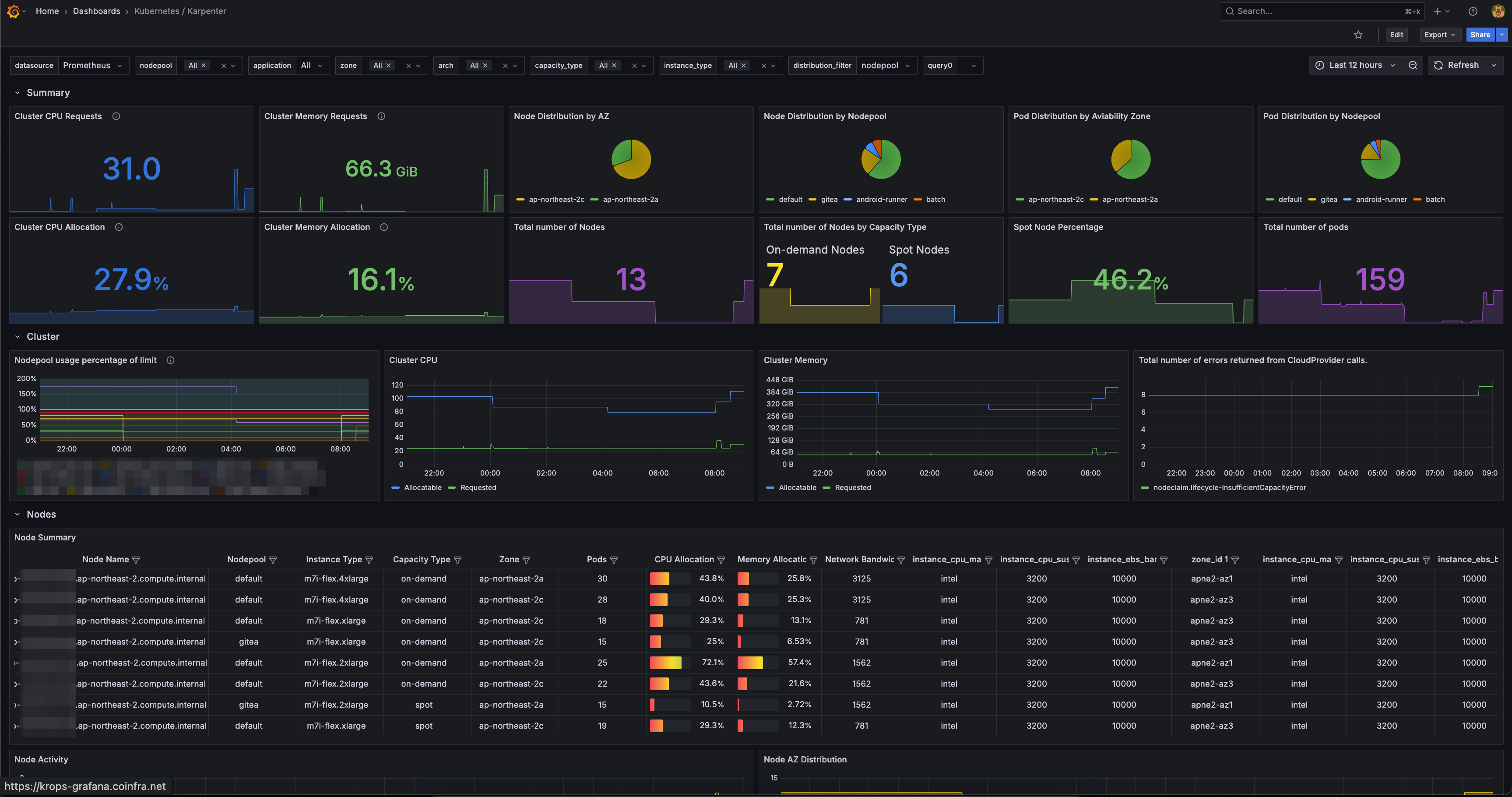
Integrate Grafana dashboards with Prometheus metrics for real-time Karpenter monitoring.
flowchart LR
    user["Users"]
    subgraph k8s[Kubernetes Cluster]
        direction LR
        kp["`**Pod**
        karpenter`"]
        ks["`**Service**
        ClusterIP`"]
        dash["`**Grafana**
        Dashboard`"]
        prom["`**Pod**
        prometheus-server`"]
    end

    user --View--> dash
    prom --Scrape /metrics--> ks --> kp
    dash --Query--> prom

    style kp fill:darkorange,color:#fff,stroke:#333
Grafana dashboard ID 20398 provides NodePool status, Spot ratio, and node-level resource utilization.
TLDR
Running Karpenter 1.8.1 + NTH with Spot fallback for 5 months resulted in zero Spot interruption impact. Maintained a stable 80-85% Spot node ratio across the cluster.
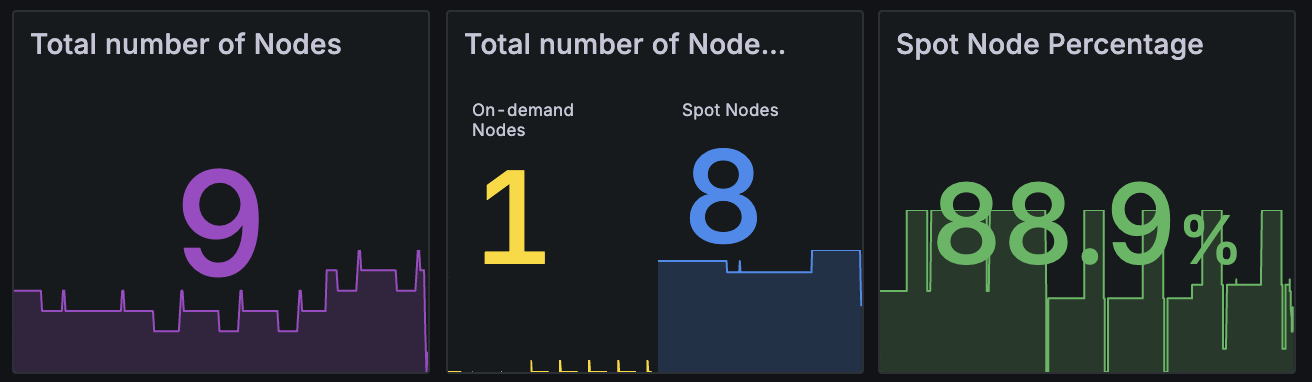
The graph shows Karpenter's Capacity Type node ratio from Grafana. Spot instances maintain a stable 80-85% share, with the remaining 15-20% as fallback On-Demand instances.
Querying Spot nodes via kubectl:
kubectl get node -l karpenter.sh/capacity-type=spotNAME STATUS ROLES AGE VERSION
ip-xx-xxx-xx-xxx.ap-northeast-2.compute.internal Ready <none> 8d v1.32.9-eks-113cf36
ip-xx-xxx-xx-xx.ap-northeast-2.compute.internal Ready <none> 23h v1.32.9-eks-113cf36
ip-xx-xxx-xx-xx.ap-northeast-2.compute.internal Ready <none> 13h v1.32.9-eks-113cf36
ip-xx-xxx-xx-xxx.ap-northeast-2.compute.internal Ready <none> 10d v1.32.9-eks-113cf36
ip-xx-xxx-xx-xxx.ap-northeast-2.compute.internal Ready <none> 65m v1.32.9-eks-113cf36
ip-xx-xxx-xx-xx.ap-northeast-2.compute.internal Ready <none> 29m v1.32.9-eks-113cf36
ip-xx-xxx-xx-xxx.ap-northeast-2.compute.internal Ready <none> 13d v1.32.9-eks-113cf36Spot + Fallback NodePool saved $120/month per EC2, totaling $3,600/month in savings.