nth
Overview
This post covers:
- How Node Termination Handler (NTH) works and its key features.
- Installing and operating NTH using a Helm chart.
Written for SREs and DevOps Engineers managing Kubernetes clusters on AWS.
Background
Considerations for EKS Spot Worker Nodes
Spot instances reduce costs and improve scalability on EKS, but they can be terminated at any time.
When using Spot instances as EKS worker nodes, you must handle Spot Instance Interruption Notifications (ITN). AWS EC2 sends an interruption notification event 2 minutes before terminating a Spot instance.
Required actions when handling Spot ITN in EKS:
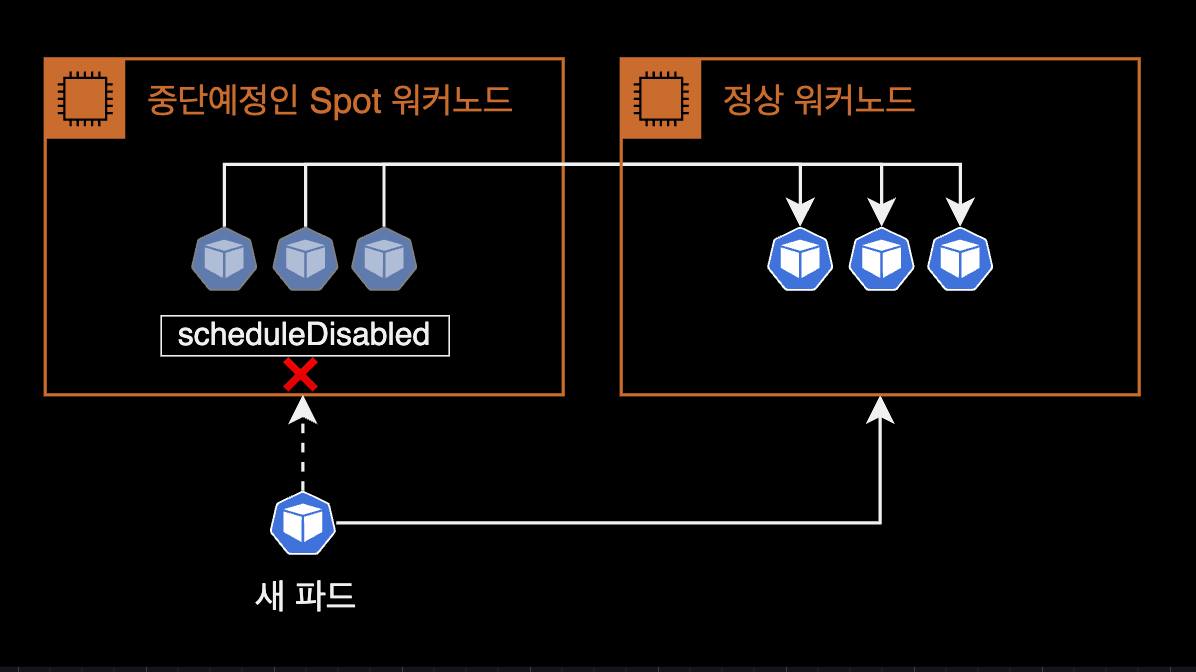
- cordon: Prevent new pods from being scheduled on the node about to be terminated.
- drain: Relocate running pods to other worker nodes.
Without handling Spot ITN, application code may not shut down properly, or new pods could accidentally be scheduled on a node about to be terminated. Manually handling every interruption event is not feasible.
This is why the Node Termination Handler controller was created.
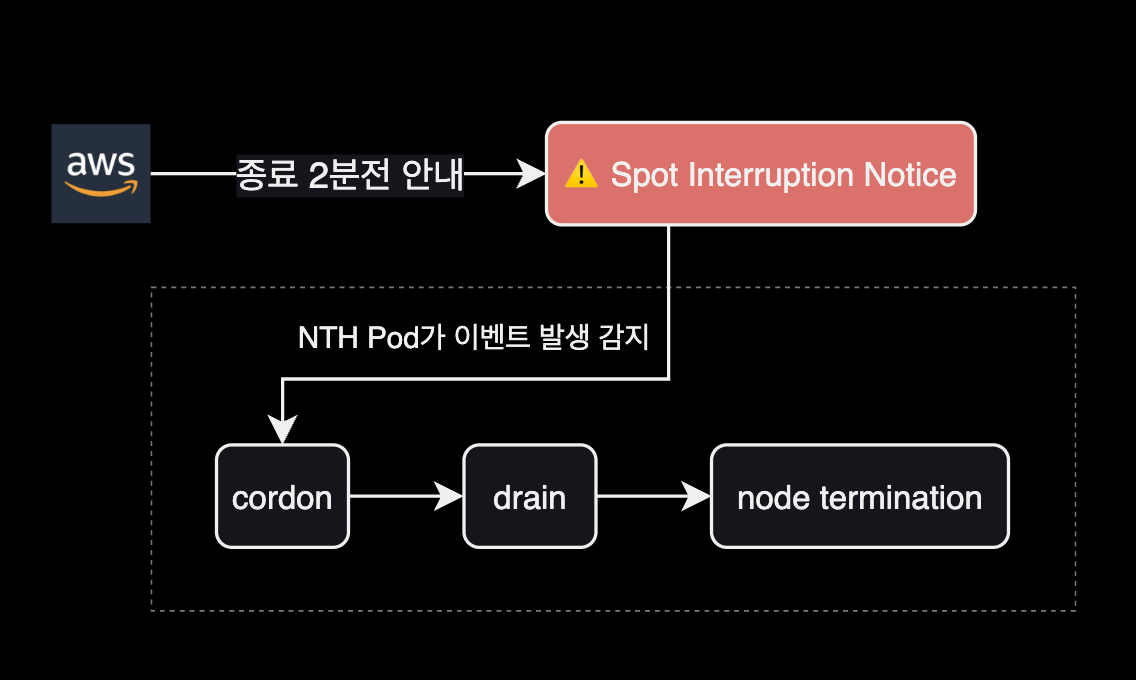
NTH detects Spot ITN events, evicts pods, and cordons the affected node. The Kubernetes Eviction API respects PDB and terminationGracePeriodSeconds, ensuring graceful pod shutdown.
The following diagram shows NTH operating in IMDS mode:
---
title: Node Termination Handler in IMDS(Instance Metadata Service) mode
---
flowchart LR
    AWS[EC2 Service] --> |1 Spot ITN event| IMDS

    NTH --> |2 Watch Spot ITN event from IMDS| IMDS
    NTH <--> |3 Cordon + Eviction API| API[Kubernetes API Server]
    API --> |4 Cordon| Node[Node Resource]

    API <--> |5 Verify PDB compliance| PDB["PDB<br>(Pod Disruption Budget)"]
    kubelet[kubelet] --> |6 Watch pod deletion command| API
    kubelet --> |7 Send **SIGTERM** signal| Pod["Pod(s)"]

    Pod -.-> |8 Graceful Shutdown| Shutdown(Graceful Shutdown)

    subgraph Cluster["⎈ Kubernetes Cluster"]
      subgraph Node["Worker Node (Spot EC2)"]
        IMDS
        NTH
        kubelet
        Pod
      end
        API
        PDB
        Shutdown
    end

    classDef aws fill:#FF9900,stroke:#232F3E,color:white;
    classDef k8s fill:#326CE5,stroke:#fff,color:white;
    classDef shutdown fill:#D3455B,stroke:#fff,color:white;

    class AWS,IMDS aws;
    class API,PDB,Pod,NTH k8s;
    class Shutdown shutdown;
NTH lets you save costs with Spot instances while mitigating the instability risk of unexpected terminations.
How NTH Works
aws-node-termination-handler (NTH) operates in one of two modes. Both IMDS and Queue Processor modes monitor EC2 instance events, but each supports different event types.
| Feature | IMDS Processor | Queue Processor |
|---|---|---|
| Spot Instance Termination Notifications (ITN) | ✅ | ✅ |
| Scheduled Events | ✅ | ✅ |
| Instance Rebalance Recommendation | ✅ | ✅ |
| ASG Termination Lifecycle Hooks | ❌ | ✅ |
| ASG Termination Lifecycle State Change | ✅ | ❌ |
| AZ Rebalance Recommendation | ❌ | ✅ |
| Instance State Change Events | ❌ | ✅ |
| Issue Lifecycle Heartbeats | ❌ | ✅ |
For broader event coverage, Queue Processor mode is recommended. It requires additional SQS and EventBridge infrastructure, making setup more complex than IMDS mode.
NTH Installation Modes
IMDS and Queue Processor modes differ in pod deployment method and configuration.
IMDS (Instance Metadata Service) Mode
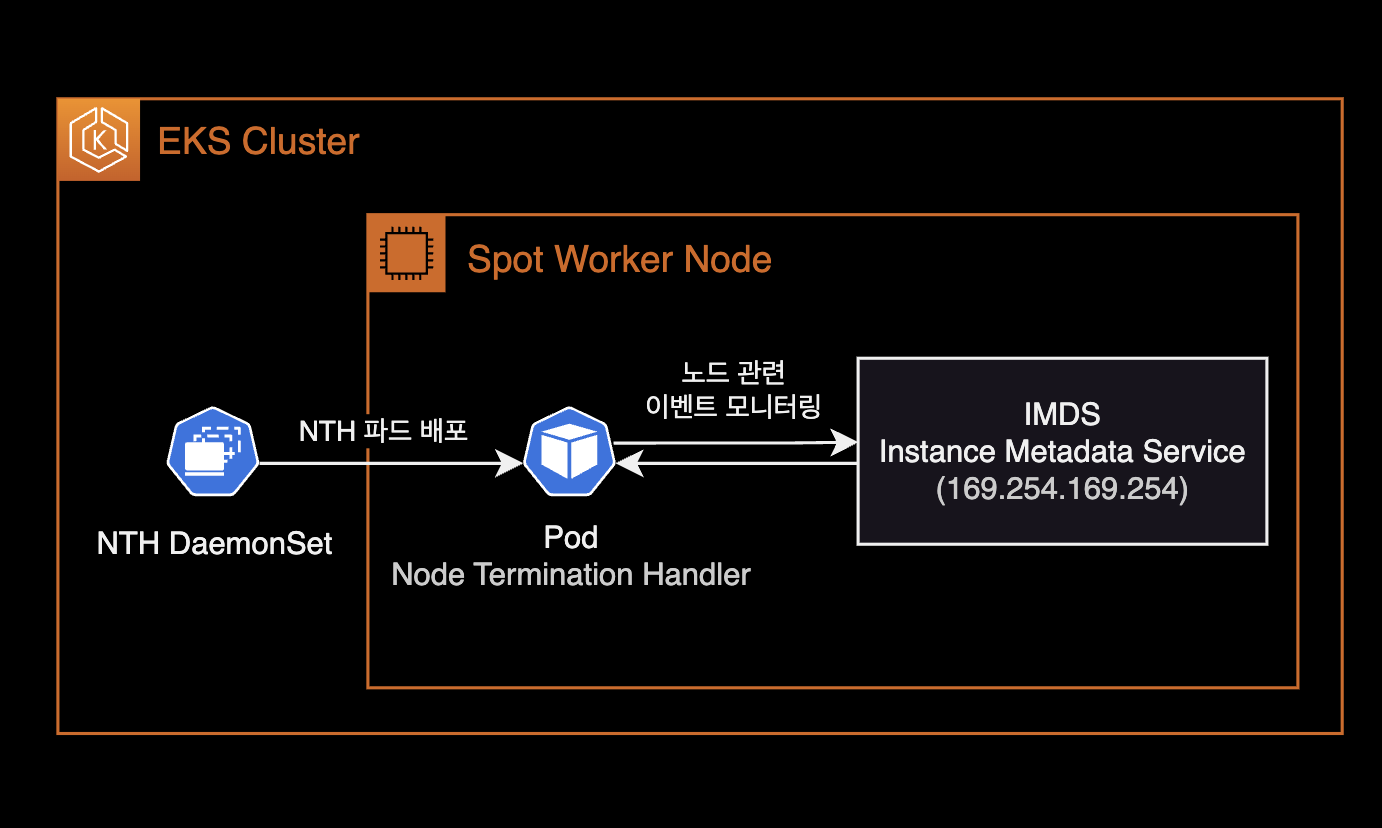
- NTH pods are deployed as a DaemonSet.
- NTH communicates with IMDS inside EC2 to monitor instance metadata endpoints like
spot/andevents/. - Simpler setup than Queue Processor mode — just deploy the Helm chart.
- No IAM Role (IRSA) attachment needed for NTH pods.
Queue Processor Mode
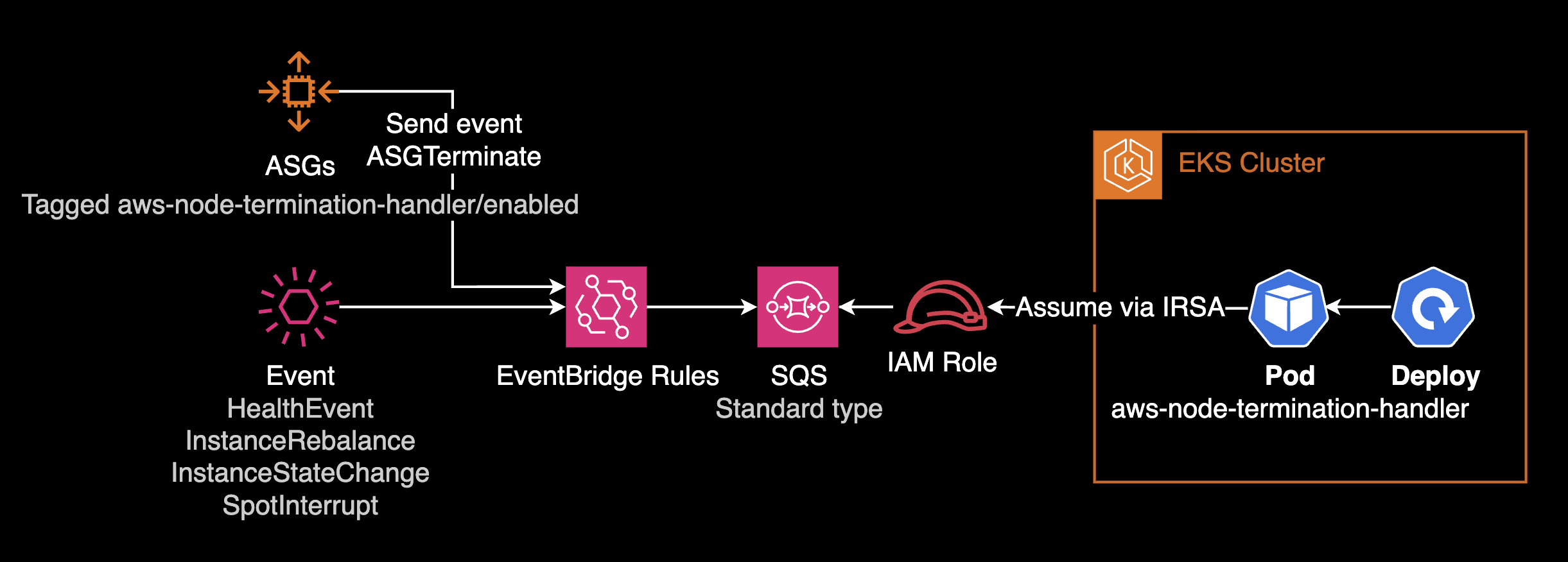
- NTH pods are deployed as a Deployment.
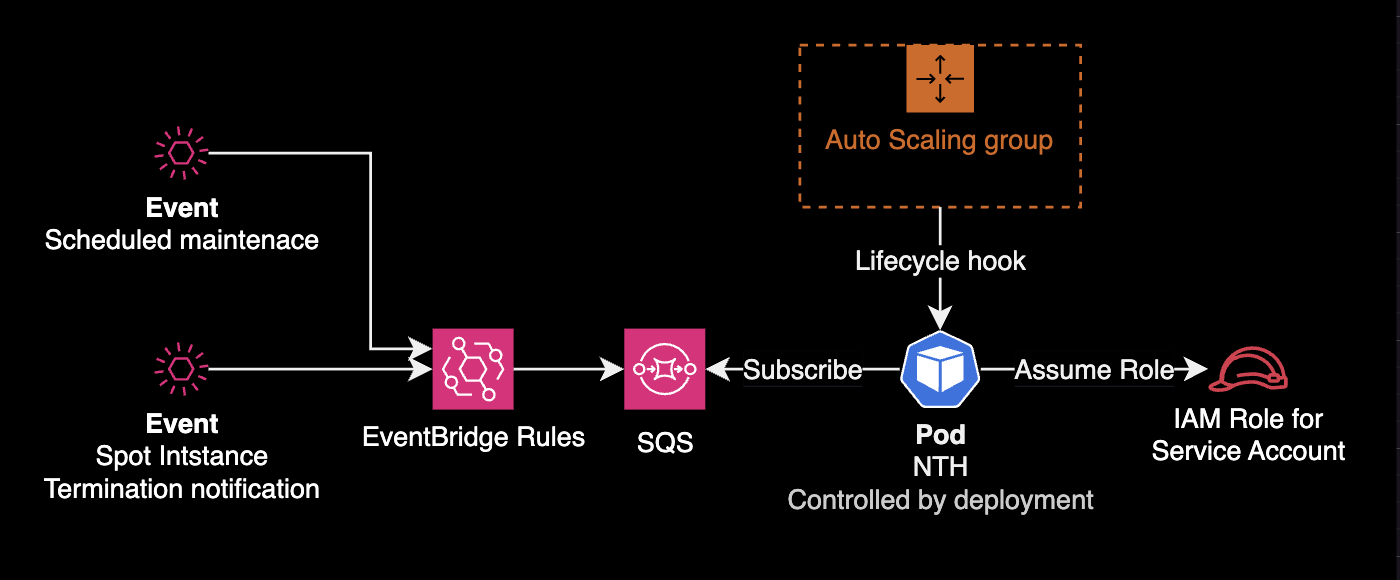
- Requires additional infrastructure: IAM Role (IRSA), EventBridge Rule, SQS queue for event detection and processing.
- More complex setup compared to IMDS mode.
- terraform-aws-eks-blueprints-addons can provision EventBridge Rules, SQS, IAM Role, and ASG configuration (Tagging, Lifecycle Hook) in one go.
Environment
Local
- helm v3.12.0
- kubectl v1.27.2
Kubernetes
- EKS v1.25
- Node Termination Handler v1.19.0 (chart v0.21.0)
Installation
Goal: Install NTH in IMDS mode using a Helm chart.
Download the Chart
Clone the AWS NTH official repository:
$ git clone https://github.com/aws/aws-node-termination-handler.gitThe repository includes a Helm chart.
Navigate to the chart directory:
$ cd aws-node-termination-handler/config/helm/aws-node-termination-handlerChart directory structure:
$ tree .
.
├── Chart.yaml
├── README.md
├── example-values-imds-linux.yaml
├── example-values-imds-windows.yaml
├── example-values-queue.yaml
├── templates
│   ├── NOTES.txt
│   ├── _helpers.tpl
│   ├── clusterrole.yaml
│   ├── clusterrolebinding.yaml
│   ├── daemonset.linux.yaml
│   ├── daemonset.windows.yaml
│   ├── deployment.yaml
│   ├── pdb.yaml
│   ├── podmonitor.yaml
│   ├── psp.yaml
│   ├── service.yaml
│   ├── serviceaccount.yaml
│   └── servicemonitor.yaml
└── values.yaml

2 directories, 19 files
Chart Configuration
Three key settings to modify in values.yaml:
- Target node selection: Use nodeSelector or nodeAffinity to deploy NTH only to specific node groups.
- Resource limits: Set resource requests and limits for NTH DaemonSet pods.
- webhookURL: Slack incoming webhook URL for NTH event notifications.
daemonsetNodeSelector
Deploy NTH pods only to Spot instance nodes:
# values.yaml
daemonsetNodeSelector:
  eks.amazonaws.com/capacityType: SPOT
Without this constraint, NTH pods deploy to all nodes including On-Demand, wasting resources.
nodeAffinity
For more complex node selection, use nodeAffinity instead of nodeSelector.
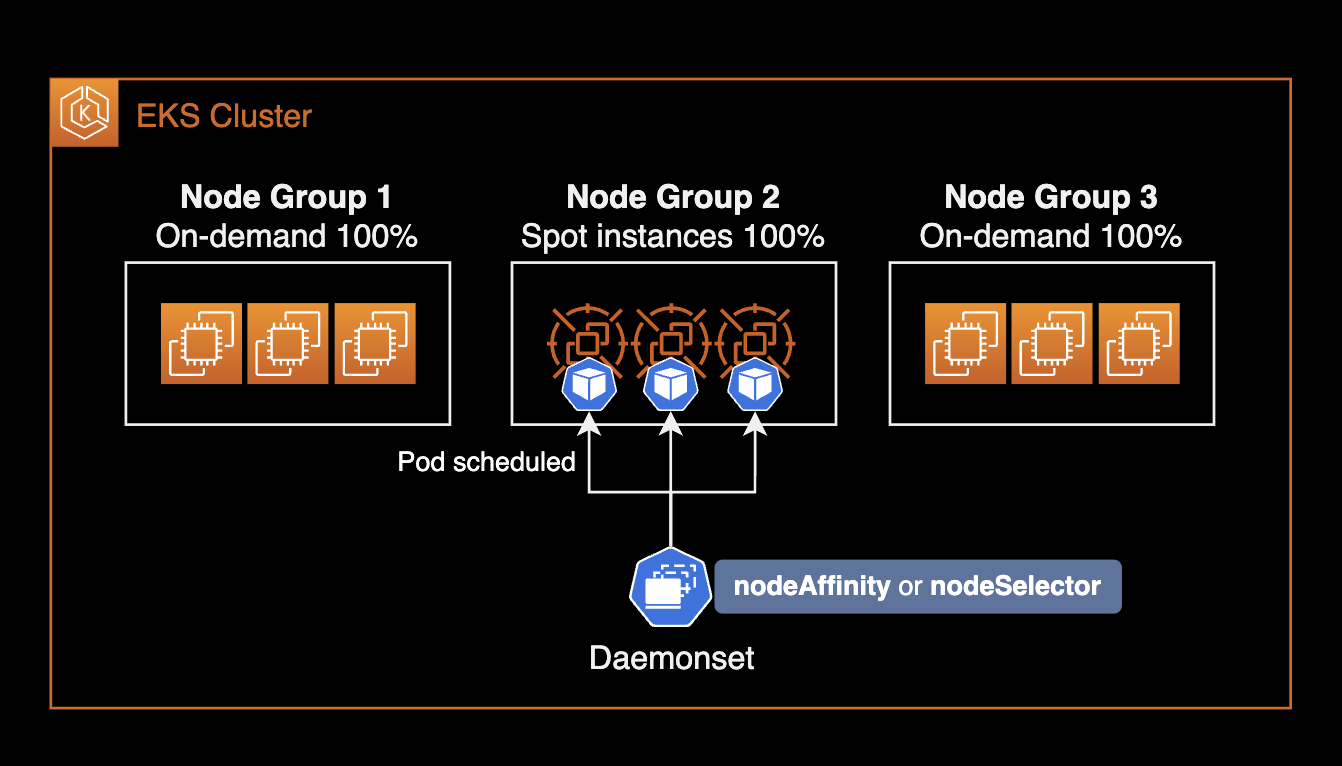
Example targeting specific node groups:
# values.yaml
daemonsetAffinity:
  nodeAffinity:
    requiredDuringSchedulingIgnoredDuringExecution:
      nodeSelectorTerms:
        - matchExpressions:
            - key: "eks.amazonaws.com/compute-type"
              operator: NotIn
              values:
                - fargate
            - key: node.kubernetes.io/name
              operator: In
              values:
              - hpc-spot
              - data-batch-spot
Multiple matchExpressions conditions are ANDed. The above deploys NTH pods only to nodes that:
- Are not Fargate type (On-Demand or Spot)
- Belong to
hpc-spotordata-batch-spotnode groups
Pod Resource Limits
The official NTH Helm chart has no default resource limits. DaemonSet pods typically need minimal resources:
# values.yaml
resources:
  requests:
    cpu: 10m
    memory: 40Mi
  limits:
    cpu: 100m
    memory: 100Mi
PSP Configuration
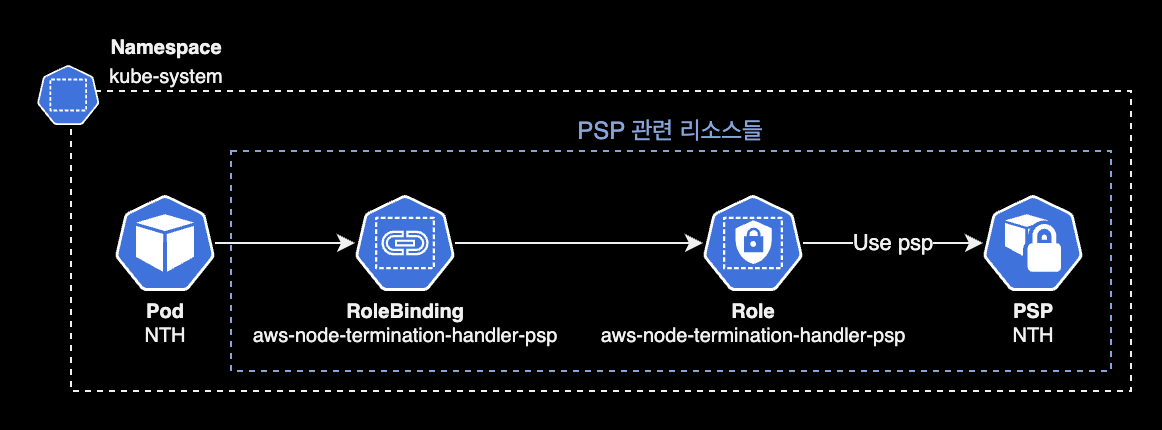
PSP (Pod Security Policy) is removed since Kubernetes v1.25. Set rbac.pspEnabled to false for EKS v1.25+:
# aws-node-termination-handle/values_ENV.yaml
...
  rbac:
    create: true
+     pspEnabled: true
-     pspEnabled: false
When rbac.pspEnabled is false, the following resources are not created (controlled by the psp.yaml template):
- PSP Role
- PSP RoleBinding
- PSP
NTH pod's PSP resource relationship:
webhookURL (Optional)
Set a Slack incoming webhook URL for cordon & drain notifications:
# values.yaml
webhookURL: "${SLACK_WEBHOOK_URL}"
Leave empty if Slack notifications are not needed:
# values.yaml
webhookURL: ""
webhookTemplate (Optional)
Customize the Slack notification message template via webhookTemplate. Use YAML Folded Scalar (>) for readability:
# values.yaml
webhookTemplate: >
  {
    "text": ":rotating_light: *EC2 Spot instance is about to be interrupted.* :rotating_light:\n
    *_Account:_* `{{ .AccountId }}`\n
    *_Instance ID:_* `{{ .InstanceID }}`\n
    *_Node Name:_* `{{ .NodeName }}`\n
    *_Instance Type:_* `{{ .InstanceType }}`\n
    *_Start Time:_* `{{ .StartTime }}`\n
    *_Description:_* {{ .Description }}\n
    *_Affected Pod(s):_* `{{ .Pods }}`"
  }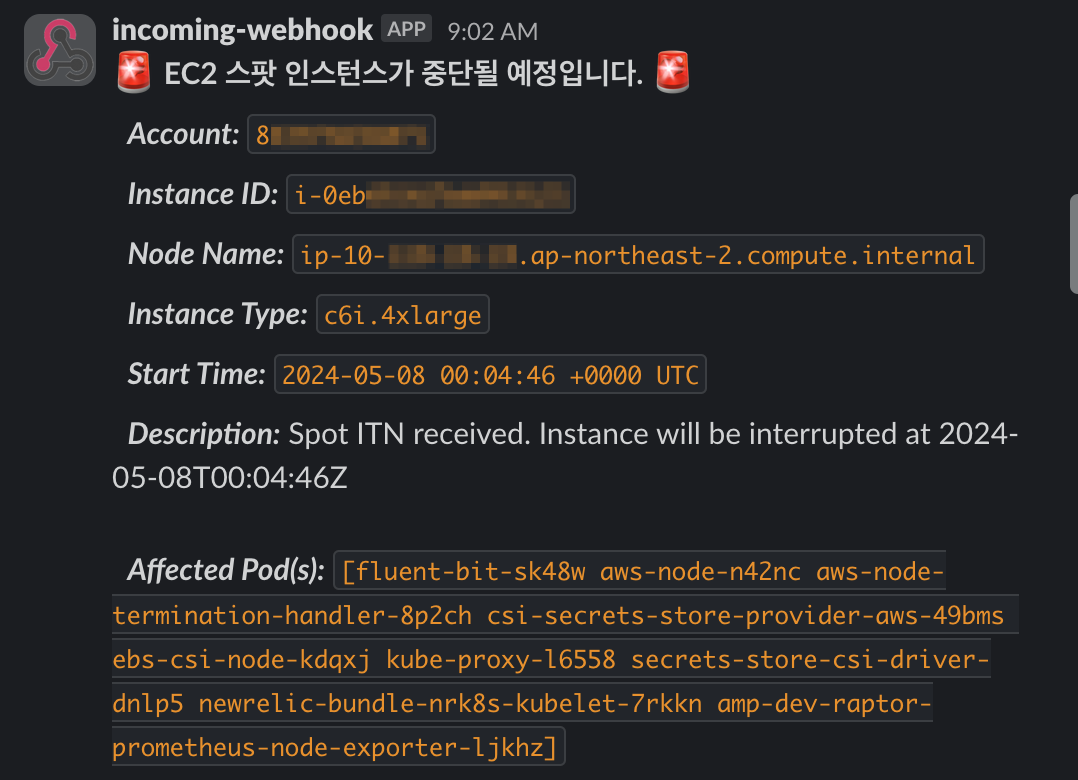
Alternatively, store the Slack template in a separate ConfigMap (or Secret) resource.
Default webhookTemplate (when left unset):
# values.yaml
webhookTemplate: "\{\"Content\":\"[NTH][Instance Interruption] InstanceId: \{\{ \.InstanceID \}\} - InstanceType: \{\{ \.InstanceType \}\} - Kind: \{\{ \.Kind \}\} - Start Time: \{\{ \.StartTime \}\}\"\}"
See the End to End test code on NTH GitHub for more details.
NTH pods must be able to reach the Slack API via NAT Gateway:
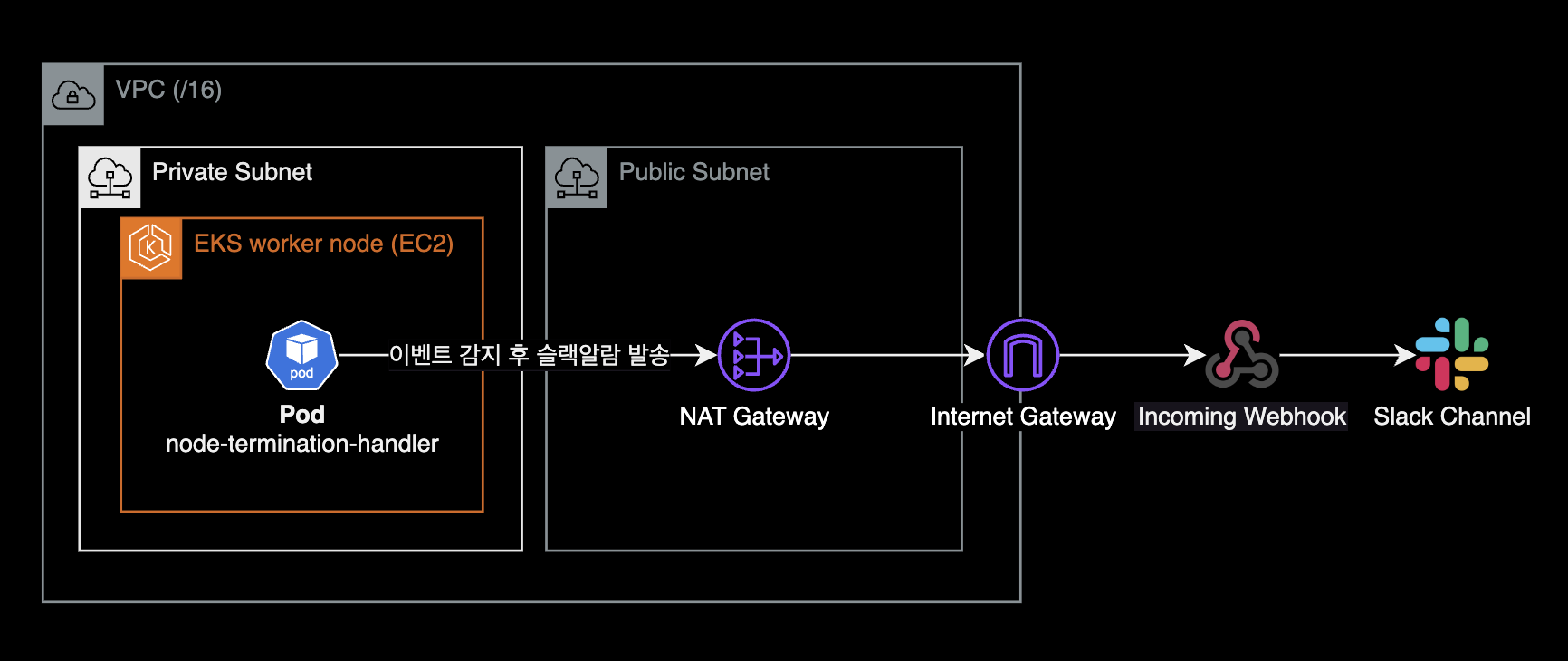
Install NTH with Helm
Install NTH in IMDS mode to kube-system namespace:
CHART_VERSION=0.21.0
helm upgrade \
  --install \
  --namespace kube-system \
  aws-node-termination-handler ./aws-node-termination-handler \
  --version $CHART_VERSION \
  --wait
NTH installs in IMDS mode by default.
To use Queue Processor mode, set enableSqsTerminationDraining to true:
# values.yaml
enableSqsTerminationDraining: true
Queue Processor mode also requires SQS queue and IAM permission setup. This post only covers IMDS mode. See the NTH official docs for details.
Release "aws-node-termination-handler" has been upgraded. Happy Helming!
NAME: aws-node-termination-handler
LAST DEPLOYED: Sun Jun 11 17:40:56 2023
NAMESPACE: kube-system
STATUS: deployed
REVISION: 5
TEST SUITE: None
NOTES:
***********************************************************************
* AWS Node Termination Handler                                        *
***********************************************************************
  Chart version: 0.21.0
  App version:   1.19.0
  Image tag:     public.ecr.aws/aws-ec2/aws-node-termination-handler:v1.19.0
  Mode :         IMDS
***********************************************************************
Confirms NTH v1.19.0 (chart v0.21.0) installed in IMDS mode.
To reinstall an existing NTH deployment, use --recreate-pods and --force:
$ helm upgrade \
    --install \
    --namespace kube-system \
    aws-node-termination-handler ./aws-node-termination-handler \
    --version $CHART_VERSION \
    --recreate-pods \
    --force
Flag --recreate-pods has been deprecated, functionality will no longer be updated. Consult the documentation for other methods to recreate podsThe deprecation warning for --recreate-pods can be safely ignored — the reinstall proceeds normally.
Verify the release:
$ helm list -n kube-systemNAME NAMESPACE REVISION UPDATED STATUS CHART APP VERSION
aws-node-termination-handler kube-system 5 2023-06-11 17:40:56.273914 +0900 KST deployed aws-node-termination-handler-0.21.0 1.19.0Check applied values:
$ helm get values aws-node-termination-handler -n kube-systemVerify that the three settings (node selection, resource limits, Slack webhook URL) are properly applied.
NTH Pod Status
Check the DaemonSet:
$ kubectl get daemonset -n kube-system aws-node-termination-handlerNAME DESIRED CURRENT READY UP-TO-DATE AVAILABLE NODE SELECTOR AGE
aws-node-termination-handler 2 2 2 2 2 eks.amazonaws.com/capacityType=SPOT,kubernetes.io/os=linux 3h56mTwo things to verify:
- NODE SELECTOR is correctly configured on the DaemonSet.
- NTH pods are deployed only to Spot instance nodes.
Since IMDS mode is primarily for handling Spot ITN events, deploying NTH to On-Demand nodes wastes resources unless there are specific events to handle.
When Spot worker nodes scale out via Kubernetes Autoscaler (or Karpenter), the DaemonSet automatically adjusts:
NAME                           DESIRED   CURRENT   READY   UP-TO-DATE   AVAILABLE   NODE SELECTOR                                                AGE
aws-node-termination-handler 2 2 2 2 2 eks.amazonaws.com/capacityType=SPOT,kubernetes.io/os=linux 3h56mAfter one more Spot instance joins (3 worker nodes total):
NAME                           DESIRED   CURRENT   READY   UP-TO-DATE   AVAILABLE   NODE SELECTOR                                                AGE
aws-node-termination-handler   3         3         3       3            3           eks.amazonaws.com/capacityType=SPOT,kubernetes.io/os=linux   3h57m
In IMDS mode, NTH pods are managed by a DaemonSet, so they automatically scale with Spot worker nodes.
Graceful Pod Shutdown
Graceful shutdown in Kubernetes ensures applications terminate safely. This is achieved by combining tGPS (terminationGracePeriodSeconds) and preStop hooks.
Related Pod Specs
spec.terminationGracePeriodSeconds: Time to wait between receiving a termination signal and actual termination. Default is30seconds.preStophook: Executes a command or HTTP request after receiving the termination signal but before the shutdown process begins. Useful for session saving, log backup, etc.
Scenarios That Trigger Termination
- Pod scaling: Scale-down terminates excess pod instances.
- Deployment updates: New container image or config changes trigger pod replacement.
- Resource pressure: Scheduler may evict pods to other nodes when resources are scarce.
- Manual deletion: User deletes pods via CLI or API.
- Node maintenance: Node enters maintenance mode or requires restart.
Graceful Shutdown Configuration Example
apiVersion: v1
kind: Pod
metadata:
  name: example-pod
spec:
  # [1] Set pod termination grace period to 60 seconds
  terminationGracePeriodSeconds: 60
  containers:
  - name: example-container
    image: nginx
    lifecycle:
      preStop:
        exec:
          # [2] Wait 55 seconds before shutdown
          command: ["sh", "-c", "sleep 55"]
With terminationGracePeriodSeconds: 60, the preStop hook runs sleep 55 after receiving the termination signal. During this time, the pod can complete data processing, release DB connections, and clean up resources.
Pod lifecycle timeline with terminationGracePeriodSeconds and preStop:
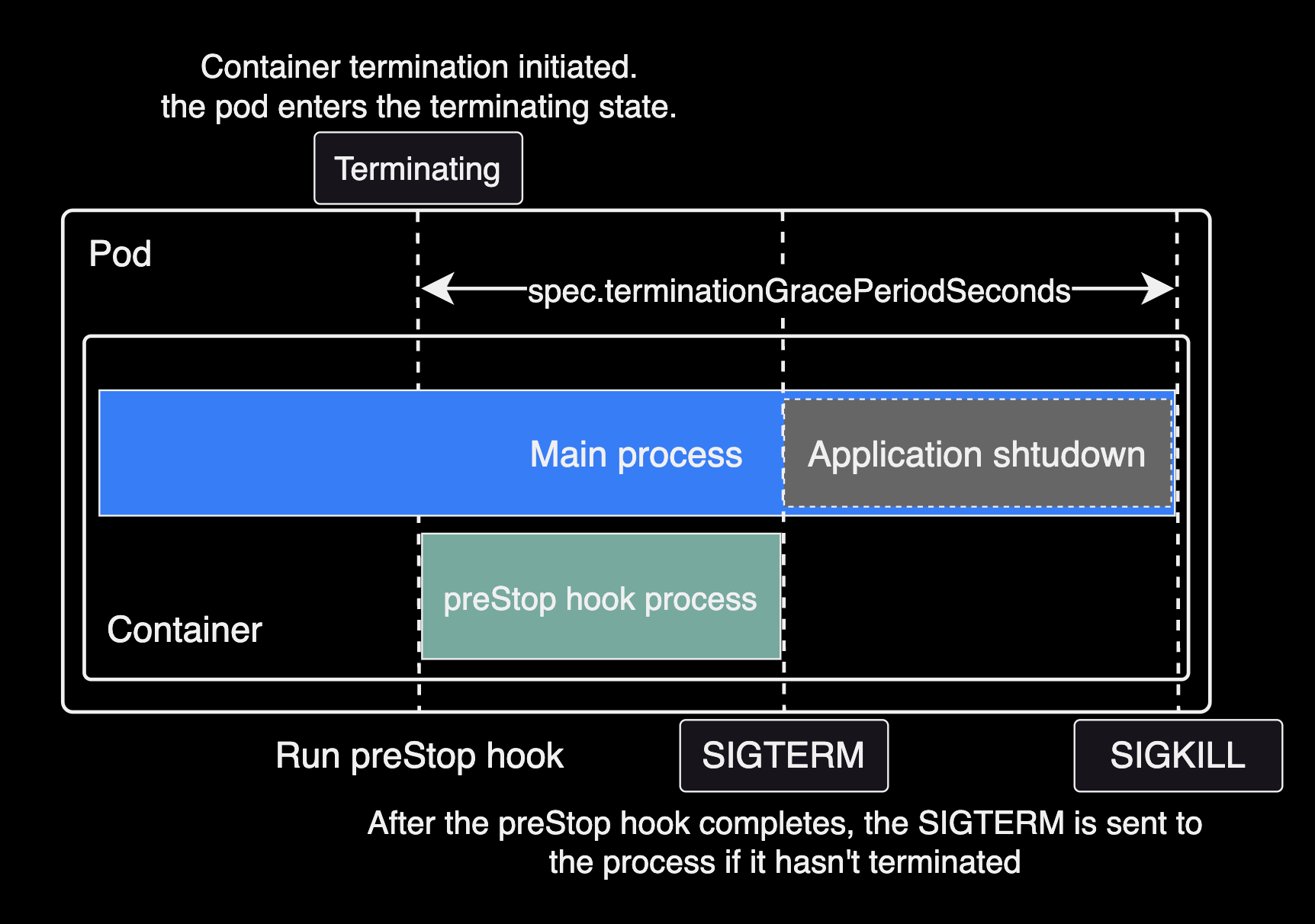
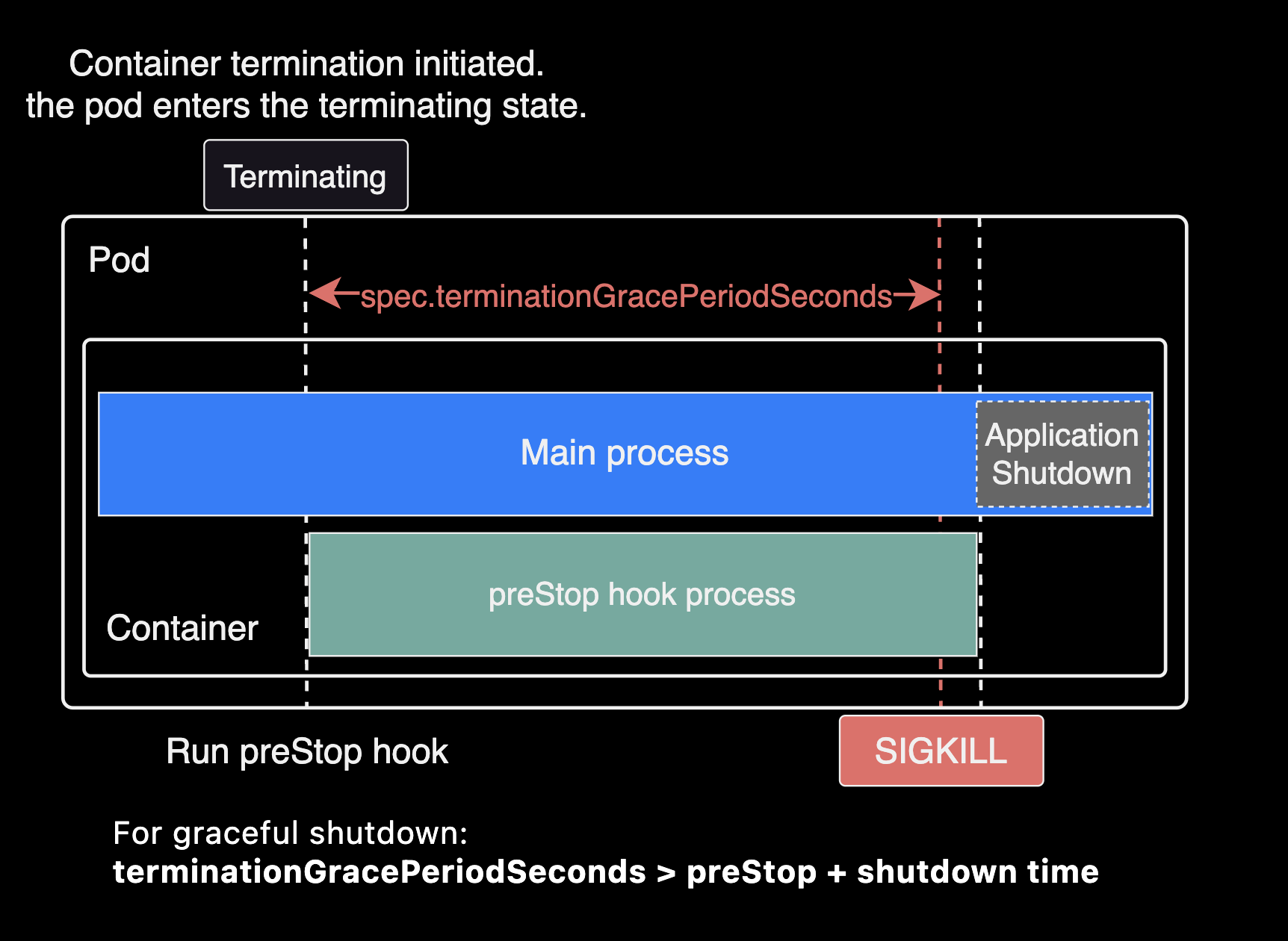
For graceful shutdown to work correctly, the sum of preStop duration and application shutdown time must be less than
spec.terminationGracePeriodSeconds.
terminationGracePeriodSeconds > preStop duration + application shutdown timeFor Spring Framework applications, these settings affect application shutdown time:
spring.cloud.gateway.httpclient.pool.max-life-time: Maximum lifetime for connection pool channels. Default isNULL(no limit). Setting this reduces the number of connections to clean up during shutdown. See the Spring Cloud Gateway docs.spring.lifecycle.timeout-per-shutdown-phase: Per-phase shutdown timeout. Reducing this shortens each shutdown phase.
Example of incorrect configuration (preStop duration + application shutdown time exceeds terminationGracePeriodSeconds):
Advanced Configuration
NTH Metrics
NTH provides Prometheus metrics on port 9092 at /metrics:
# aws-node-termination-handler/values.yaml
enablePrometheusServer: true
prometheusServerPort: 9092
Available metrics:
- actions_total: Total action count
- actions_node_total: Per-node action count (deprecated: use
actions_totalinstead) - events_error_total: Error count during event processing
Metrics collection differs depending on NTH mode (IMDS vs Queue).
serviceMonitorandpodMonitorare custom resources provided by Prometheus Operator. See the API reference.
In Queue mode, metrics can be collected via:
- serviceMonitor custom resource with Prometheus Operator.
- Static
scrape_configsentry targeting the NTH service.
Example scrape_configs for Prometheus Helm chart:
# charts/prometheus/values.yaml
extraScrapeConfigs: |
  - job_name: 'aws-node-termination-handler'
    static_configs:
      - targets:
          - 'aws-node-termination-handler.kube-system.svc.cluster.local:9092'
In IMDS mode, no ClusterIP service is created, so use podMonitor to scrape metrics directly from pods:
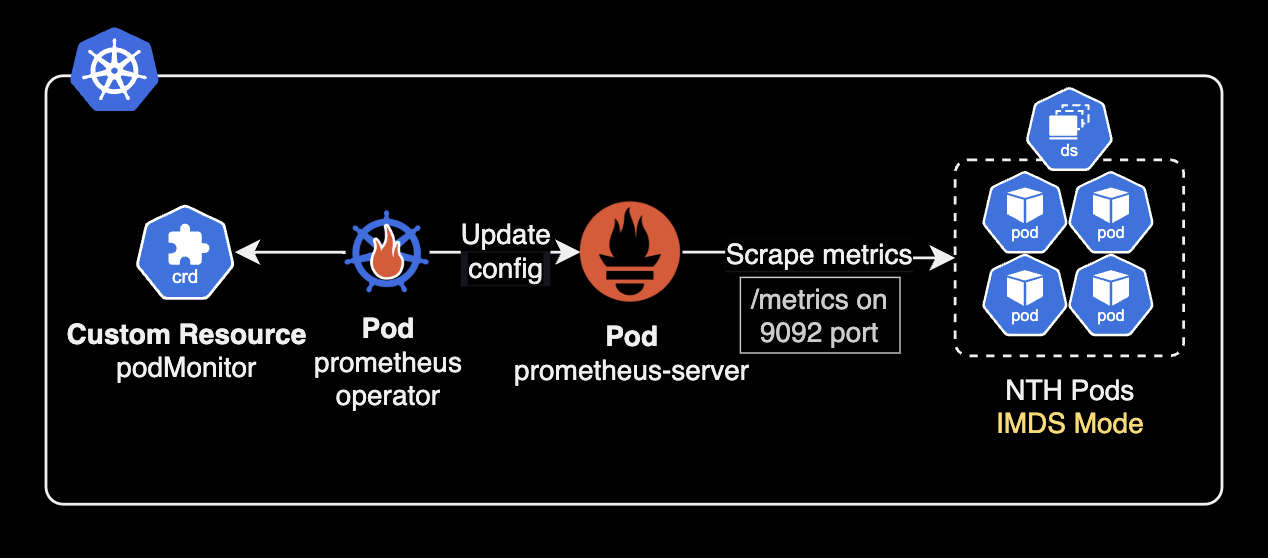
Without Prometheus Operator, add annotations to all NTH pods for auto-discovery:
# charts/aws-node-termination-handler/values.yaml
podAnnotations:
  prometheus.io/scrape: "true"
  prometheus.io/port: "9092"
  prometheus.io/path: "/metrics"

enablePrometheusServer: true
prometheusServerPort: 9092
Testing
To test NTH, a Spot interruption event (Spot ITN) must occur on a cluster using Spot instances.
Use AWS Fault Injection Service to trigger Spot instance interruptions and observe NTH behavior:
---
title: Spot ITN triggered by Fault Injection Service
---
graph LR
  F[Fault Injection Service]
  subgraph Worker Node
    NTH[Node Termination Handler <br> Pod]
    P[Pod]
  end

  subgraph NN[Worker Node]
    NP[New Pod]
  end

  F[Fault Injection Service] -- Spot ITN --> NTH
  NTH --Evict application pod--> P
  P -- Evicted --> NP

  note ~~~ NP

  note["**Note**: These all worker nodes are Spot instances"]

  style NTH fill:darkorange,color:white
  style note fill:null,color:gray,stroke-width:2px
NTH ignores DaemonSet-managed pods and performs cordon + drain on the target node for non-DaemonSet pods:
- cordon: Marks the node as unschedulable.
- drain: Evicts pods to other nodes. Pods receive SIGTERM for graceful shutdown, followed by SIGKILL after the grace period.
NTH pod logs after a Spot Interruption Notification:
2025/05/16 08:29:28 ??? WARNING: ignoring DaemonSet-managed Pods: calico-system/calico-node-hhhj4, calico-system/csi-node-driver-zg5vt, kube-system/aws-node-44nls, kube-system/aws-node-termination-handler-b57xt, kube-system/ebs-csi-node-qcp7n, kube-system/eks-pod-identity-agent-xpkpm, kube-system/kube-proxy-hwp8q, kube-system/secrets-store-csi-driver-provider-aws-4c98d, kube-system/secrets-store-csi-driver-wdj4p
2025/05/16 08:29:28 ??? evicting pod pfops/argocd-repo-server-97d8976d9-fkwxd
2025/05/16 08:29:28 ??? evicting pod kube-system/ebs-csi-controller-59fb89d9c-52rvk
2025/05/16 08:29:28 ??? evicting pod kube-system/ebs-csi-controller-59fb89d9c-jdhq7
2025/05/16 08:29:28 ??? evicting pod kyverno/kyverno-background-controller-5579d9bdbc-4mgn8
2025/05/16 08:29:28 ??? evicting pod netbox/netbox-redis-master-0
2025/05/16 08:29:28 ??? evicting pod netbox/netbox-redis-replicas-1
2025/05/16 08:29:28 ??? evicting pod netbox/netbox-redis-replicas-2
2025/05/16 08:29:28 ??? evicting pod kube-system/aws-load-balancer-controller-85679cfcc6-jh488
2025/05/16 08:29:28 ??? evicting pod kube-system/aws-load-balancer-controller-85679cfcc6-9q2gc
2025/05/16 08:29:28 ??? evicting pod kube-system/coredns-8f66cf8b8-5cwld
2025/05/16 08:29:28 ??? evicting pod kube-system/coredns-8f66cf8b8-wvrjn
2025/05/16 08:29:29 ??? error when evicting pods/"coredns-8f66cf8b8-wvrjn" -n "kube-system" (will retry after 5s): Cannot evict pod as it would violate the pod's disruption budget.
2025/05/16 08:29:29 ??? error when evicting pods/"ebs-csi-controller-59fb89d9c-52rvk" -n "kube-system" (will retry after 5s): Cannot evict pod as it would violate the pod's disruption budget.
2025/05/16 08:29:34 ??? evicting pod kube-system/coredns-8f66cf8b8-wvrjn
2025/05/16 08:29:34 ??? evicting pod kube-system/ebs-csi-controller-59fb89d9c-52rvk
2025/05/16 08:29:34 ??? error when evicting pods/"ebs-csi-controller-59fb89d9c-52rvk" -n "kube-system" (will retry after 5s): Cannot evict pod as it would violate the pod's disruption budget.
2025/05/16 08:29:39 ??? evicting pod kube-system/ebs-csi-controller-59fb89d9c-52rvk
2025/05/16 08:29:39 ??? error when evicting pods/"ebs-csi-controller-59fb89d9c-52rvk" -n "kube-system" (will retry after 5s): Cannot evict pod as it would violate the pod's disruption budget.
2025/05/16 08:29:44 ??? evicting pod kube-system/ebs-csi-controller-59fb89d9c-52rvk
2025/05/16 08:29:44 ??? error when evicting pods/"ebs-csi-controller-59fb89d9c-52rvk" -n "kube-system" (will retry after 5s): Cannot evict pod as it would violate the pod's disruption budget.
2025/05/16 08:29:49 ??? evicting pod kube-system/ebs-csi-controller-59fb89d9c-52rvk
2025/05/16 08:30:05 INF Node successfully cordoned and drained node_name=ip-10-xxx-x-xx.ap-northeast-2.compute.internal reason="Spot ITN received. Instance will be interrupted at 2025-05-16T08:31:24Z \n"
Summary
NTH (Node Termination Handler) is a DaemonSet node controller for Kubernetes. It automatically handles EC2 instance events like Spot interruptions and scheduled maintenance.
NTH operates in two modes: IMDS and Queue.
Queue mode provides broader event coverage than IMDS mode.
IMDS mode detects events via EC2 Instance Metadata Service. Queue mode uses Amazon EventBridge for wider event coverage:
Configure
preStopandspec.terminationGracePeriodSecondson pods to ensure graceful shutdown during NTH-triggered drains.NTH is essential for Spot instance environments, enabling cost efficiency while maintaining cluster stability.
NTH detects node termination events and performs cordon + drain to safely relocate pods before node shutdown, minimizing data loss and maintaining service continuity.
References
Articles:
- Karpenter and Spot for cost-effective node provisioning by ScatterLab
- Reduce Kubernetes Infrastructure cost with EC2 Spot Instances — Part 2: Running non-production at 100% Spot
Node Termination Handler:
- NTH installation guide: Official GitHub README
- NTH Helm chart: Official chart, also available on ArtifactHUB
AWS EC2 Docs:
- Spot Instance Advisor: Check Spot interruption frequency by region and instance type
- Instance metadata and user data: AWS EC2 official docs